> ## Documentation Index
> Fetch the complete documentation index at: https://domoinc-bradley-turek-pfilter-operators-reference.mintlify.site/llms.txt
> Use this file to discover all available pages before exploring further.

# システム権限 | リファレンス

## はじめに

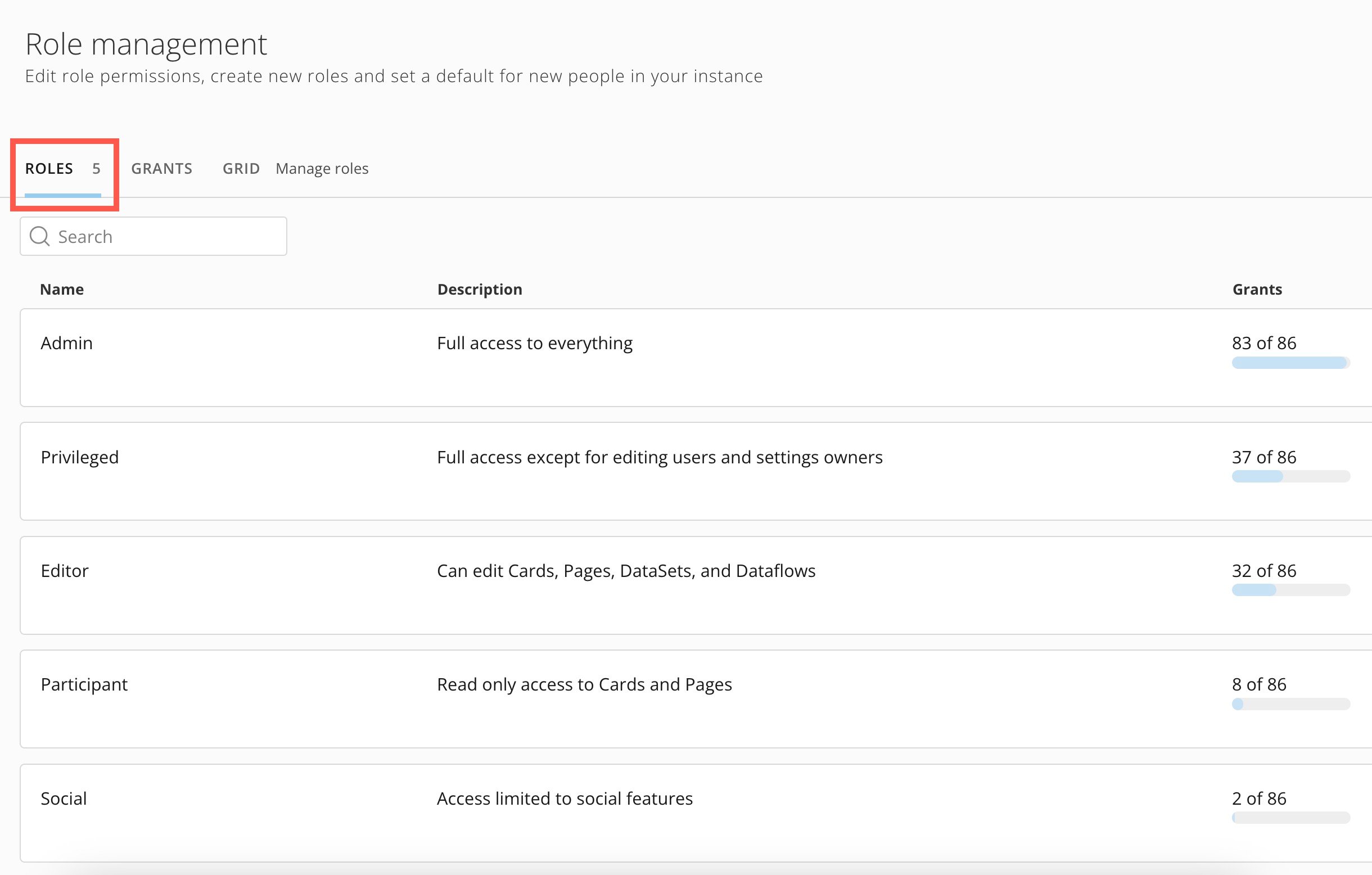
Domoには5つのシステム権限があります。

* 管理者
* パワーユーザー\*
* 編集ユーザー
* 閲覧ユーザー
* ソーシャル

*\*管理者が [デフォルトの権限を変更](/s/article/360043438973) しない限り、パワーユーザーがDomoの新規ユーザーのデフォルトの権限になります。*

各システム権限には、Domoプラットフォームの一部に対する、様々なタスクを実行するための様々な許可または特定の権限が含まれています。ユーザーにシステム権限が割り当てられると、その権限に含まれる許可が付与されます。

システム権限を編集することはできませんが、システム権限を [複製](/s/article/360043438973)

して変更し、新しいカスタマイズされた権限として保存することはできます。その他のカスタマイズされた権限の作成と許可の割り当ての詳細については、「 [権限を管理する](/s/article/360043438973) 」を参照してください。

この記事では、5つのシステム権限の違いについて説明します。ソーシャルは、最も基本的なアクセス権を付与します。それに続く各権限には、その下の権限とまったく同じ許可と追加の許可がすべて含まれます。管理者権限は、利用可能なほぼすべての許可へのアクセス権を付与します。詳細については、後述の「 [管理者](#admin) 」を参照してください。

## ソーシャル

ソーシャルは、最も基本的なシステム権限です。 [Buzz](/s/article/360042925574) 、 [ユーザープロフィール](https://domo-support.domo.com/s/topic/0TO5w000000ZaoLGAS/user-profile) 、 [プロジェクトとタスク](https://domo-support.domo.com/s/topic/0TO5w000000Zao5GAC/projects-and-tasks) にのみアクセスできます。

ソーシャルユーザーは、既存の [アラート](/s/article/360043430533) に登録でき、DomoプラットフォームAPIを認証するためのアクセストークンのOAuthクライアントを作成できます。

Domoのウェブバージョンでは、ソーシャルユーザーは、含まれているカードを閲覧するためにダッシュボードを開くことはできません。

## 閲覧ユーザー、編集ユーザー、パワーユーザーの権限を比較する

閲覧ユーザー、編集ユーザー、パワーユーザーの権限には、ソーシャルの権限が持つすべてのアクセス権が含まれます。以下の表では、各権限に含まれる追加のアクセス権について説明します。

<Note>
  **注記：** 管理者が [変更](/s/article/360043438973) しない限り、パワーユーザーが新規Domoユーザーのデフォルトの権限になります。
</Note>

<table border="1" cellpadding="1" cellspacing="1" data-aura-rendered-by="33:203;a"><thead><tr><th colspan="1" rowspan="1"><p> 機能 </p></th><th colspan="1" rowspan="1"><p> アクセス </p></th><th colspan="1" rowspan="1"><p> 閲覧ユーザー </p></th><th colspan="1" rowspan="1"><p> 編集ユーザー </p></th><th colspan="1" rowspan="1"><p> パワーユーザー </p></th></tr></thead><tbody><tr><td colspan="1" rowspan="2"><p><b> アラート </b></p></td><td colspan="1" rowspan="1"><p> アクセス権のある <a href="/s/article/360043430533" target="_self"> アラート </a> を作成、編集、シェアします。 </p></td><td colspan="1" rowspan="1"><p><i className="icon-check-square-fill text-green-600 sm" role="img" aria-label="Yes" /></p></td><td colspan="1" rowspan="1"><p><i className="icon-check-square-fill text-green-600 sm" role="img" aria-label="Yes" /></p></td><td colspan="1" rowspan="1"><p><i className="icon-check-square-fill text-green-600 sm" role="img" aria-label="Yes" /></p></td></tr><tr><td colspan="1" rowspan="1"><p> ユーザーが所有するアラートのアラート操作を表示、編集、追加、削除します。 </p></td><td colspan="1" rowspan="1"><i className="icon-x text-red-600 sm" role="img" aria-label="No" /></td><td colspan="1" rowspan="1"><i className="icon-check-square-fill text-green-600 sm" role="img" aria-label="Yes" /></td><td colspan="1" rowspan="1"><i className="icon-check-square-fill text-green-600 sm" role="img" aria-label="Yes" /></td></tr><tr><td colspan="1" rowspan="3"><p><b> Appstore </b></p></td><td colspan="1" rowspan="1"><p><a href="/s/article/360043438013" target="_self"> Domo Appstore </a> とAppの情報を表示します。 </p></td><td colspan="1" rowspan="1"><i className="icon-check-square-fill text-green-600 sm" role="img" aria-label="Yes" /></td><td colspan="1" rowspan="1"><i className="icon-check-square-fill text-green-600 sm" role="img" aria-label="Yes" /></td><td colspan="1" rowspan="1"><p><i className="icon-check-square-fill text-green-600 sm" role="img" aria-label="Yes" /></p></td></tr><tr><td colspan="1" rowspan="1"><p> Domo AppstoreからAppを <a href="/s/article/000005182" target="_self"> インストールして使用 </a> します。 </p></td><td colspan="1" rowspan="1"><p><i className="icon-x text-red-600 sm" role="img" aria-label="No" /></p></td><td colspan="1" rowspan="1"><i className="icon-check-square-fill text-green-600 sm" role="img" aria-label="Yes" /></td><td colspan="1" rowspan="1"><i className="icon-check-square-fill text-green-600 sm" role="img" aria-label="Yes" /></td></tr><tr><td colspan="1" rowspan="1"><p> 以前にインストールしたAppを <a href="/s/article/000005182#remove-an-installed-app" target="_self"> アンインストール </a> します。 </p></td><td colspan="1" rowspan="1"><p><i className="icon-x text-red-600 sm" role="img" aria-label="No" /></p></td><td colspan="1" rowspan="1"><i className="icon-x text-red-600 sm" role="img" aria-label="No" /></td><td colspan="1" rowspan="1"><i className="icon-check-square-fill text-green-600 sm" role="img" aria-label="Yes" /></td></tr><tr><td colspan="1" rowspan="6"><p><b> カードとダッシュボード </b></p></td><td colspan="1" rowspan="1"><p><a target="_self"> スケジュールレポート </a> を作成し、Domoコンテンツ\*をメール、印刷、PowerPoint、CSVファイル、Excelにエクスポートします。 </p><p> \* <em> 閲覧ユーザーの権限のみ、Domoカードとダッシュボードへの読み取り専用アクセス権が付与されます。カードやダッシュボードに情報を追加しているDataSetにはアクセスできません。 </em></p></td><td colspan="1" rowspan="1"><i className="icon-check-square-fill text-green-600 sm" role="img" aria-label="Yes" /></td><td colspan="1" rowspan="1"><p><i className="icon-check-square-fill text-green-600 sm" role="img" aria-label="Yes" /></p></td><td colspan="1" rowspan="1"><p><i className="icon-check-square-fill text-green-600 sm" role="img" aria-label="Yes" /></p></td></tr><tr><td colspan="1" rowspan="1"><p> 認証の有無に関係なく、Domo Everywhereを使ってカードとダッシュボードを外部で <a href="/s/article/360043437993" target="_self"> エンベッド </a> します。 </p></td><td colspan="1" rowspan="1"><i className="icon-x text-red-600 sm" role="img" aria-label="No" /></td><td colspan="1" rowspan="1"><i className="icon-check-square-fill text-green-600 sm" role="img" aria-label="Yes" /></td><td colspan="1" rowspan="1"><i className="icon-check-square-fill text-green-600 sm" role="img" aria-label="Yes" /></td></tr><tr><td colspan="1" rowspan="1"><p> アクセス権のあるカード、ドリルパス、Beast Mode計算を作成、編集、削除します。 </p></td><td colspan="1" rowspan="1"><i className="icon-x text-red-600 sm" role="img" aria-label="No" /></td><td colspan="1" rowspan="1"><i className="icon-check-square-fill text-green-600 sm" role="img" aria-label="Yes" /></td><td colspan="1" rowspan="1"><i className="icon-check-square-fill text-green-600 sm" role="img" aria-label="Yes" /></td></tr><tr><td colspan="1" rowspan="1"><p> AnalyzerでDataSetビューを作成し編集します。 </p></td><td colspan="1" rowspan="1"><i className="icon-x text-red-600 sm" role="img" aria-label="No" /></td><td colspan="1" rowspan="1"><i className="icon-check-square-fill text-green-600 sm" role="img" aria-label="Yes" /></td><td colspan="1" rowspan="1"><i className="icon-check-square-fill text-green-600 sm" role="img" aria-label="Yes" /></td></tr><tr><td colspan="1" rowspan="1"><p> ダッシュボード、スタイル、テンプレート、レイアウトを作成、編集、削除します。 </p></td><td colspan="1" rowspan="1"><i className="icon-x text-red-600 sm" role="img" aria-label="No" /></td><td colspan="1" rowspan="1"><i className="icon-check-square-fill text-green-600 sm" role="img" aria-label="Yes" /></td><td colspan="1" rowspan="1"><i className="icon-check-square-fill text-green-600 sm" role="img" aria-label="Yes" /></td></tr><tr><td colspan="1" rowspan="1"><p> メモカードで自然言語生成ナラティブを作成し編集します。 </p></td><td colspan="1" rowspan="1"><i className="icon-x text-red-600 sm" role="img" aria-label="No" /></td><td colspan="1" rowspan="1"><i className="icon-check-square-fill text-green-600 sm" role="img" aria-label="Yes" /></td><td colspan="1" rowspan="1"><i className="icon-check-square-fill text-green-600 sm" role="img" aria-label="Yes" /></td></tr><tr><td colspan="1" rowspan="9"><p><b> データ </b></p></td><td colspan="1" rowspan="1"><p><a href="/s/article/9221297758615" target="_self"> AppDB </a> にデータを作成します。 </p></td><td colspan="1" rowspan="1"><p><i className="icon-x text-red-600 sm" role="img" aria-label="No" /></p></td><td colspan="1" rowspan="1"><p><i className="icon-check-square-fill text-green-600 sm" role="img" aria-label="Yes" /></p></td><td colspan="1" rowspan="1"><p><i className="icon-check-square-fill text-green-600 sm" role="img" aria-label="Yes" /></p></td></tr><tr><td colspan="1" rowspan="1"><p> アクセス権のある <a href="https://domo-support.domo.com/s/topic/0TO5w000000ZanRGAS/data-center-overview" target="_self"> DataSet </a> を作成、編集、削除します。 </p></td><td colspan="1" rowspan="1"><p><i className="icon-x text-red-600 sm" role="img" aria-label="No" /></p></td><td colspan="1" rowspan="1"><p><i className="icon-check-square-fill text-green-600 sm" role="img" aria-label="Yes" /></p></td><td colspan="1" rowspan="1"><p><i className="icon-check-square-fill text-green-600 sm" role="img" aria-label="Yes" /></p></td></tr><tr><td colspan="1" rowspan="1"><p> アクセス権のあるDataSetからデータを <a href="https://domo-support.domo.com/s/topic/0TO5w000000ZanjGAC/exporting-content" target="_self"> エクスポート </a> します。 </p></td><td colspan="1" rowspan="1"><p><i className="icon-x text-red-600 sm" role="img" aria-label="No" /></p></td><td colspan="1" rowspan="1"><p><i className="icon-check-square-fill text-green-600 sm" role="img" aria-label="Yes" /></p></td><td colspan="1" rowspan="1"><p><i className="icon-check-square-fill text-green-600 sm" role="img" aria-label="Yes" /></p></td></tr><tr><td colspan="1" rowspan="1"><p> そのインスタンスでのDataSetの <a href="/s/article/360042926054" target="_self"> アカウント </a> を作成します。 </p></td><td colspan="1" rowspan="1"><p><i className="icon-x text-red-600 sm" role="img" aria-label="No" /></p></td><td colspan="1" rowspan="1"><p><i className="icon-check-square-fill text-green-600 sm" role="img" aria-label="Yes" /></p></td><td colspan="1" rowspan="1"><p><i className="icon-check-square-fill text-green-600 sm" role="img" aria-label="Yes" /></p></td></tr><tr><td colspan="1" rowspan="1"><p><a href="/s/article/4406022964375" target="_self"> Workbench </a> のダウンロードを許可します。 </p></td><td colspan="1" rowspan="1"><p><i className="icon-x text-red-600 sm" role="img" aria-label="No" /></p></td><td colspan="1" rowspan="1"><p><i className="icon-check-square-fill text-green-600 sm" role="img" aria-label="Yes" /></p></td><td colspan="1" rowspan="1"><p><i className="icon-check-square-fill text-green-600 sm" role="img" aria-label="Yes" /></p></td></tr><tr><td colspan="1" rowspan="1"><p> アクセス権のあるDataFlowを作成、編集、削除します。 <b> 注記： </b> 「DataSetを編集」の許可が必要です。 </p></td><td colspan="1" rowspan="1"><p><i className="icon-x text-red-600 sm" role="img" aria-label="No" /></p></td><td colspan="1" rowspan="1"><p><i className="icon-check-square-fill text-green-600 sm" role="img" aria-label="Yes" /></p></td><td colspan="1" rowspan="1"><p><i className="icon-check-square-fill text-green-600 sm" role="img" aria-label="Yes" /></p></td></tr><tr><td colspan="1" rowspan="1"><p><a href="/s/article/360048127854" target="_self"> AutoML </a> モデルをトレーニングします。AutoML推論の操作を含むDataFlowを実行します。 </p></td><td colspan="1" rowspan="1"><p><i className="icon-x text-red-600 sm" role="img" aria-label="No" /></p></td><td colspan="1" rowspan="1"><p><i className="icon-check-square-fill text-green-600 sm" role="img" aria-label="Yes" /></p></td><td colspan="1" rowspan="1"><p><i className="icon-check-square-fill text-green-600 sm" role="img" aria-label="Yes" /></p></td></tr><tr><td colspan="1" rowspan="1"><p> アクセス権のある <a href="/s/article/360055259234" target="_self"> Magic ETL DataFlow </a> を作成、編集、実行します。 </p></td><td colspan="1" rowspan="1"><p><i className="icon-x text-red-600 sm" role="img" aria-label="No" /></p></td><td colspan="1" rowspan="1"><p><i className="icon-check-square-fill text-green-600 sm" role="img" aria-label="Yes" /></p></td><td colspan="1" rowspan="1"><p><i className="icon-check-square-fill text-green-600 sm" role="img" aria-label="Yes" /></p></td></tr><tr><td colspan="1" rowspan="1"><p> アクセス権のある <a href="/s/article/36004740075" target="_self"> Jupyterワークスペース </a> を作成、編集、削除します。 <b> 注記： </b> 「DataSetを編集」の許可が必要です。 </p></td><td colspan="1" rowspan="1"><p><i className="icon-x text-red-600 sm" role="img" aria-label="No" /></p></td><td colspan="1" rowspan="1"><p><i className="icon-check-square-fill text-green-600 sm" role="img" aria-label="Yes" /></p></td><td colspan="1" rowspan="1"><p><i className="icon-check-square-fill text-green-600 sm" role="img" aria-label="Yes" /></p></td></tr><tr><td colspan="1" rowspan="2"><p><b> DomoApp </b></p></td><td colspan="1" rowspan="1"><p> アクセス権のあるカスタマイズされたDomoAppを表示します。 </p></td><td colspan="1" rowspan="1"><i className="icon-check-square-fill text-green-600 sm" role="img" aria-label="Yes" /></td><td colspan="1" rowspan="1"><p><i className="icon-check-square-fill text-green-600 sm" role="img" aria-label="Yes" /></p></td><td colspan="1" rowspan="1"><p><i className="icon-check-square-fill text-green-600 sm" role="img" aria-label="Yes" /></p></td></tr><tr><td colspan="1" rowspan="1"><p> カスタマイズされたDomoAppを作成、編集、アップロードします。 </p></td><td colspan="1" rowspan="1"><p><i className="icon-x text-red-600 sm" role="img" aria-label="No" /></p></td><td colspan="1" rowspan="1"><i className="icon-check-square-fill text-green-600 sm" role="img" aria-label="Yes" /></td><td colspan="1" rowspan="1"><i className="icon-check-square-fill text-green-600 sm" role="img" aria-label="Yes" /></td></tr><tr><td colspan="1" rowspan="1"><p><b> フォーム </b></p></td><td colspan="1" rowspan="1"><p> 新規 <a href="/s/article/000005171" target="_self"> フォーム </a> を作成します。 </p></td><td colspan="1" rowspan="1"><i className="icon-x text-red-600 sm" role="img" aria-label="No" /></td><td colspan="1" rowspan="1"><i className="icon-check-square-fill text-green-600 sm" role="img" aria-label="Yes" /></td><td colspan="1" rowspan="1"><i className="icon-check-square-fill text-green-600 sm" role="img" aria-label="Yes" /></td></tr><tr><td colspan="1" rowspan="1"><p><b> 目標 </b></p></td><td colspan="1" rowspan="1"><p> アクセス権のある任意の <a href="/s/article/4578278680855" target="_self"> 目標 </a> を作成、編集します。 </p></td><td colspan="1" rowspan="1"><p><i className="icon-check-square-fill text-green-600 sm" role="img" aria-label="Yes" /></p></td><td colspan="1" rowspan="1"><p><i className="icon-check-square-fill text-green-600 sm" role="img" aria-label="Yes" /></p></td><td colspan="1" rowspan="1"><p><i className="icon-check-square-fill text-green-600 sm" role="img" aria-label="Yes" /></p></td></tr><tr><td colspan="1" rowspan="1"><b> パイプラインExecutor Service </b></td><td colspan="1" rowspan="1"> カスタムのパイプライン処理を作成、編集、または削除します。 </td><td colspan="1" rowspan="1"><p><i className="icon-x text-red-600 sm" role="img" aria-label="No" /></p></td><td colspan="1" rowspan="1"><p><i className="icon-x text-red-600 sm" role="img" aria-label="No" /></p></td><td colspan="1" rowspan="1"><p><i className="icon-check-square-fill text-green-600 sm" role="img" aria-label="Yes" /></p></td></tr><tr><td colspan="1" rowspan="1"><p><b> キュー </b></p></td><td colspan="1" rowspan="1"><p> 新しいタスク <a href="/s/article/000005172" target="_self"> キュー </a> を作成します。 </p></td><td colspan="1" rowspan="1"><p><i className="icon-x text-red-600 sm" role="img" aria-label="No" /></p></td><td colspan="1" rowspan="1"><p><i className="icon-check-square-fill text-green-600 sm" role="img" aria-label="Yes" /></p></td><td colspan="1" rowspan="1"><p><i className="icon-check-square-fill text-green-600 sm" role="img" aria-label="Yes" /></p></td></tr><tr><td colspan="1" rowspan="3"><p><b> ユーザーとグループ </b></p></td><td colspan="1" rowspan="1"><p> インスタンスに <a target="_self"> 新しいユーザーを追加 </a> します。 </p></td><td colspan="1" rowspan="1"><p><i className="icon-x text-red-600 sm" role="img" aria-label="No" /></p></td><td colspan="1" rowspan="1"><p><i className="icon-x text-red-600 sm" role="img" aria-label="No" /></p></td><td colspan="1" rowspan="1"><p><i className="icon-check-square-fill text-green-600 sm" role="img" aria-label="Yes" /></p></td></tr><tr><td colspan="1" rowspan="1"> アクセス権のある <a href="/s/article/360042934294" target="_self"> グループ </a> を作成、編集、削除します。メンバーの追加や削除などが含まれます。 </td><td colspan="1" rowspan="1"><p><i className="icon-x text-red-600 sm" role="img" aria-label="No" /></p></td><td colspan="1" rowspan="1"><p><i className="icon-x text-red-600 sm" role="img" aria-label="No" /></p></td><td colspan="1" rowspan="1"><p><i className="icon-check-square-fill text-green-600 sm" role="img" aria-label="Yes" /></p></td></tr><tr><td colspan="1" rowspan="1"> アワードを作成、編集、削除します。 </td><td colspan="1" rowspan="1"><p><i className="icon-x text-red-600 sm" role="img" aria-label="No" /></p></td><td colspan="1" rowspan="1"><p><i className="icon-x text-red-600 sm" role="img" aria-label="No" /></p></td><td colspan="1" rowspan="1"><p><i className="icon-check-square-fill text-green-600 sm" role="img" aria-label="Yes" /></p></td></tr><tr><td colspan="1" rowspan="2"><p><b> ワークフロー </b></p></td><td colspan="1" rowspan="1"><p> アクセス権のあるコンテンツに対する <a href="/s/article/360043430613" target="_self"> 認証 </a> リクエストを提出します。 <a id="admin" target="_blank" /></p></td><td colspan="1" rowspan="1"><p><i className="icon-check-square-fill text-green-600 sm" role="img" aria-label="Yes" /></p></td><td colspan="1" rowspan="1"><p><i className="icon-check-square-fill text-green-600 sm" role="img" aria-label="Yes" /></p></td><td colspan="1" rowspan="1"><i className="icon-check-square-fill text-green-600 sm" role="img" aria-label="Yes" /></td></tr><tr><td colspan="1" rowspan="1"><p> ワークフローモデルを <a href="/s/article/000005331" target="_self"> 作成 </a> します。 </p></td><td colspan="1" rowspan="1"><i className="icon-x text-red-600 sm" role="img" aria-label="No" /></td><td colspan="1" rowspan="1"><i className="icon-check-square-fill text-green-600 sm" role="img" aria-label="Yes" /></td><td colspan="1" rowspan="1"><i className="icon-check-square-fill text-green-600 sm" role="img" aria-label="Yes" /></td></tr></tbody></table>

## 管理者

「管理者」のシステム権限 には、いくつかの例外を除き、利用可能なほとんどすべての許可が含まれます。

管理者権限やその他の権限に含まれる許可を含む、利用可能な許可の完全なリストを表示するには、 <img src="https://mintlify.s3.us-west-1.amazonaws.com/domoinc-bradley-turek-pfilter-operators-reference/images/kb/ja/ka0Vq000000CLlS-00N5w00000Ri7BU-0EMVq000005mBXl.jpg" style={{width: 20, height: 20, display: 'inline', verticalAlign: 'start', margin: '0'}} /> **［管理者］** > **［権限］** （ **［ガバナンス］** セクション内）に進みます。

**［権限］** タブでデフォルトの権限を選択すると、その権限に含まれる許可が表示されます。
<Frame>
  <img alt="" src="https://mintcdn.com/domoinc-bradley-turek-pfilter-operators-reference/Ylyst5VnP7UsFQlt/images/kb/ka0Vq000000Apaj-00N5w00000Ri7BU-0EMVq000005m6l0.jpg?fit=max&auto=format&n=Ylyst5VnP7UsFQlt&q=85&s=dce6f79cdec06dceee76830e8b53586e" width="2440" height="1556" data-path="images/kb/ka0Vq000000Apaj-00N5w00000Ri7BU-0EMVq000005m6l0.jpg" />
</Frame>

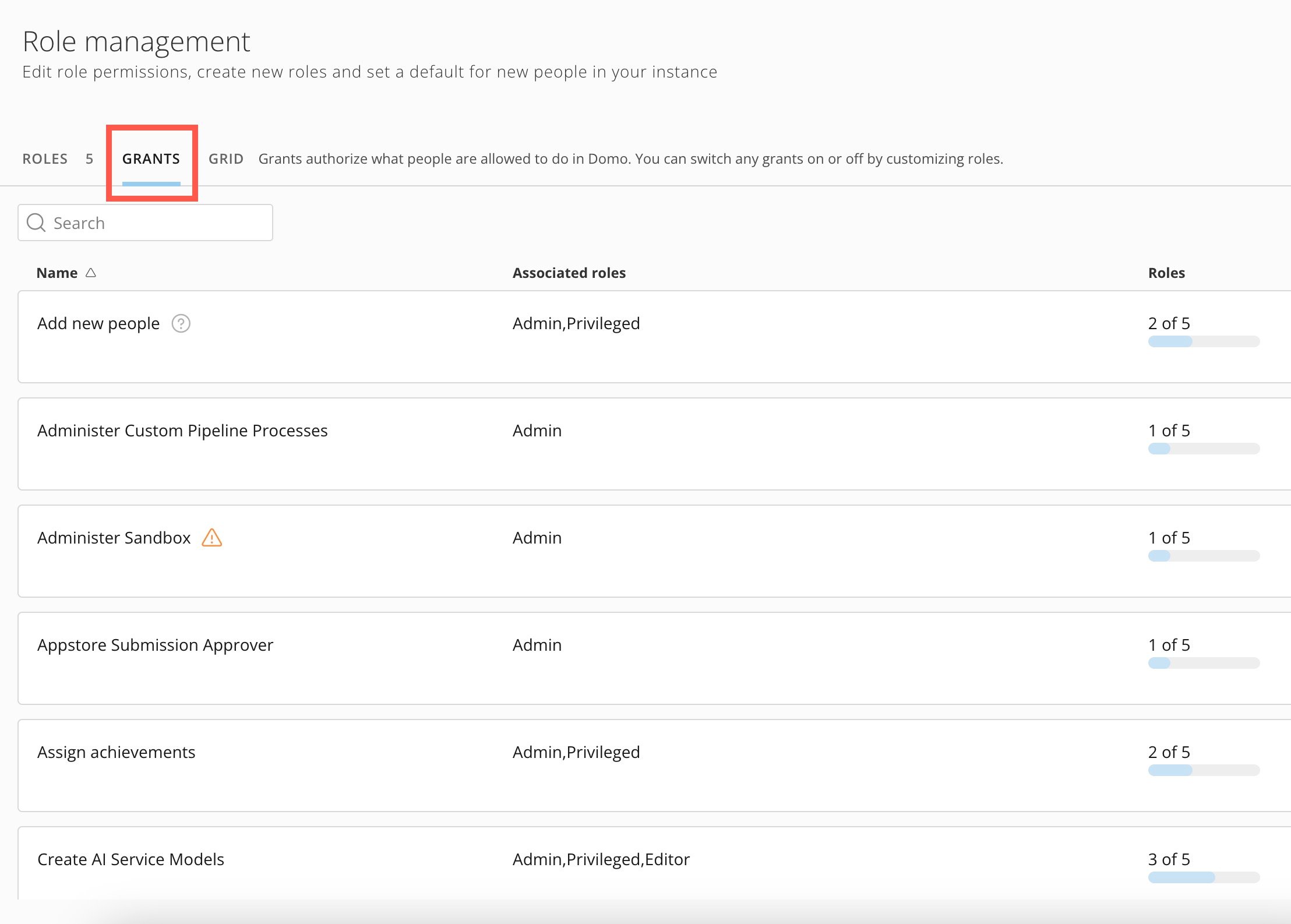
**［許可］** タブに進むと、利用可能なすべての許可が表示されます。

<Warning>
  **重要：** 警告アイコン（ <img src="https://mintlify.s3.us-west-1.amazonaws.com/domoinc-bradley-turek-pfilter-operators-reference/images/kb/ja/ka0Vq000000CLlS-00N5w00000Ri7BU-0EMVq000005P0Rl.jpg" style={{width: 20, height: 20, display: 'inline', verticalAlign: 'start', margin: '0'}} /> ）が付いた許可は、インスタンス全体の制御へのアクセス権を付与する高セキュリティの許可です。
</Warning>

<Frame>
  <img alt="" src="https://mintcdn.com/domoinc-bradley-turek-pfilter-operators-reference/Ylyst5VnP7UsFQlt/images/kb/ka0Vq000000Apaj-00N5w00000Ri7BU-0EMVq000005mBkf.jpg?fit=max&auto=format&n=Ylyst5VnP7UsFQlt&q=85&s=1e26b4525cb6958f0072c1549606918a" width="2216" height="1586" data-path="images/kb/ka0Vq000000Apaj-00N5w00000Ri7BU-0EMVq000005mBkf.jpg" />
</Frame>

日本語
