> ## Documentation Index
> Fetch the complete documentation index at: https://domoinc-bradley-turek-pfilter-operators-reference.mintlify.site/llms.txt
> Use this file to discover all available pages before exploring further.
# URL Parameters in Embedded Content
Domo Everywhere supports three main types of URL parameters in embedded content:
Transparent Backgrounds
Pfilters
AppData
ViewId (App Studio Specific)
## Transparent Backgrounds
***
Many embed customers customize the dashboard background color or image to make embedded content feel native.
With this URL parameter, making the background totally transparent can make embedded content seem even more native to the host page.
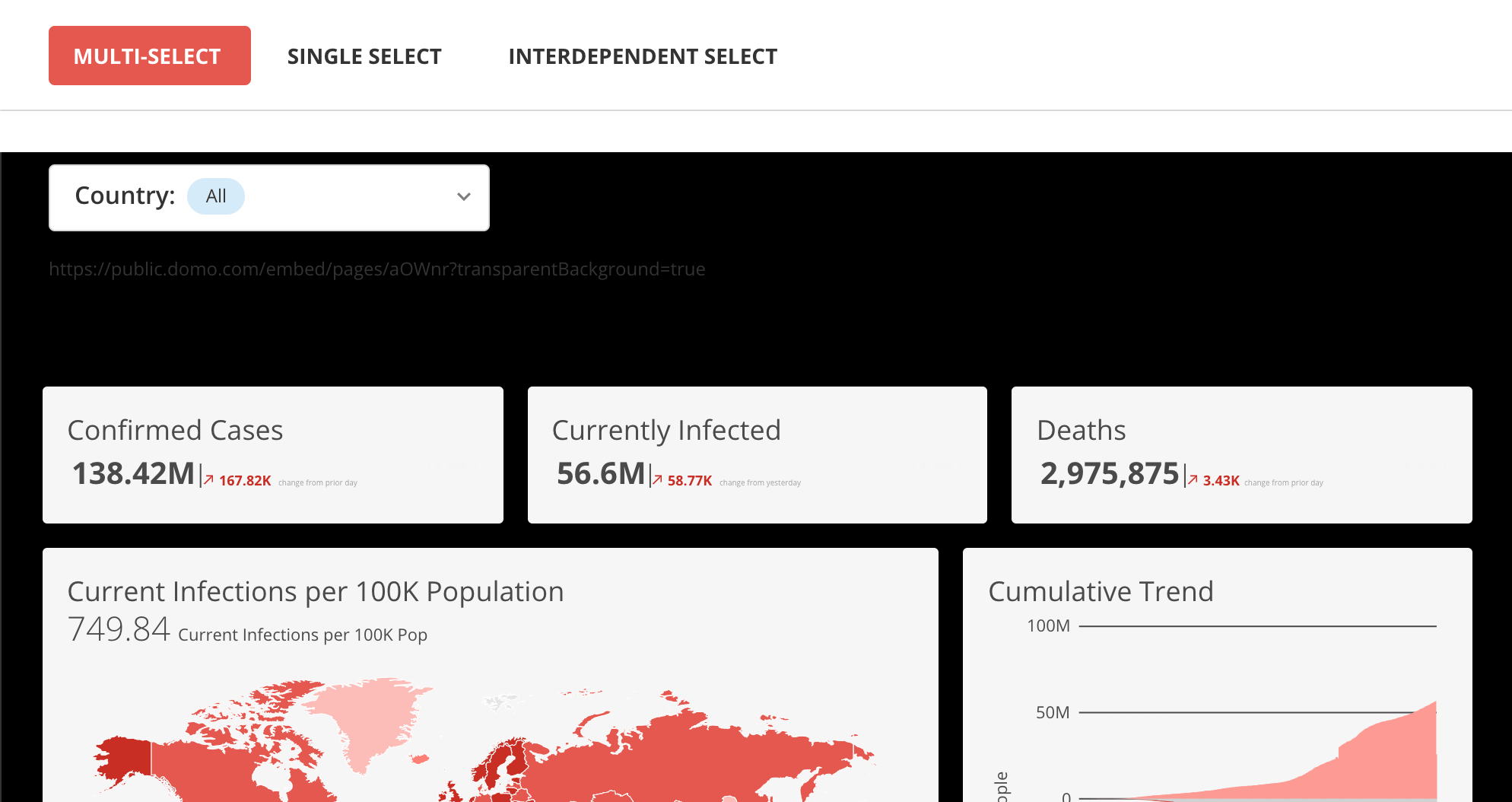
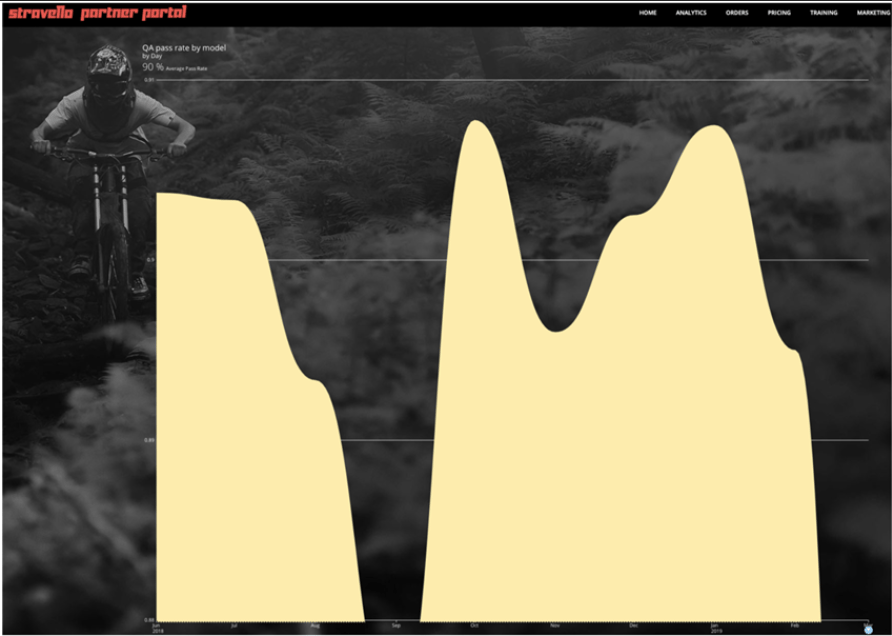
Here is how an embedded dashboard looks when the background is the host page is black and the URL parameter is set to true (?transparentBackground=true)
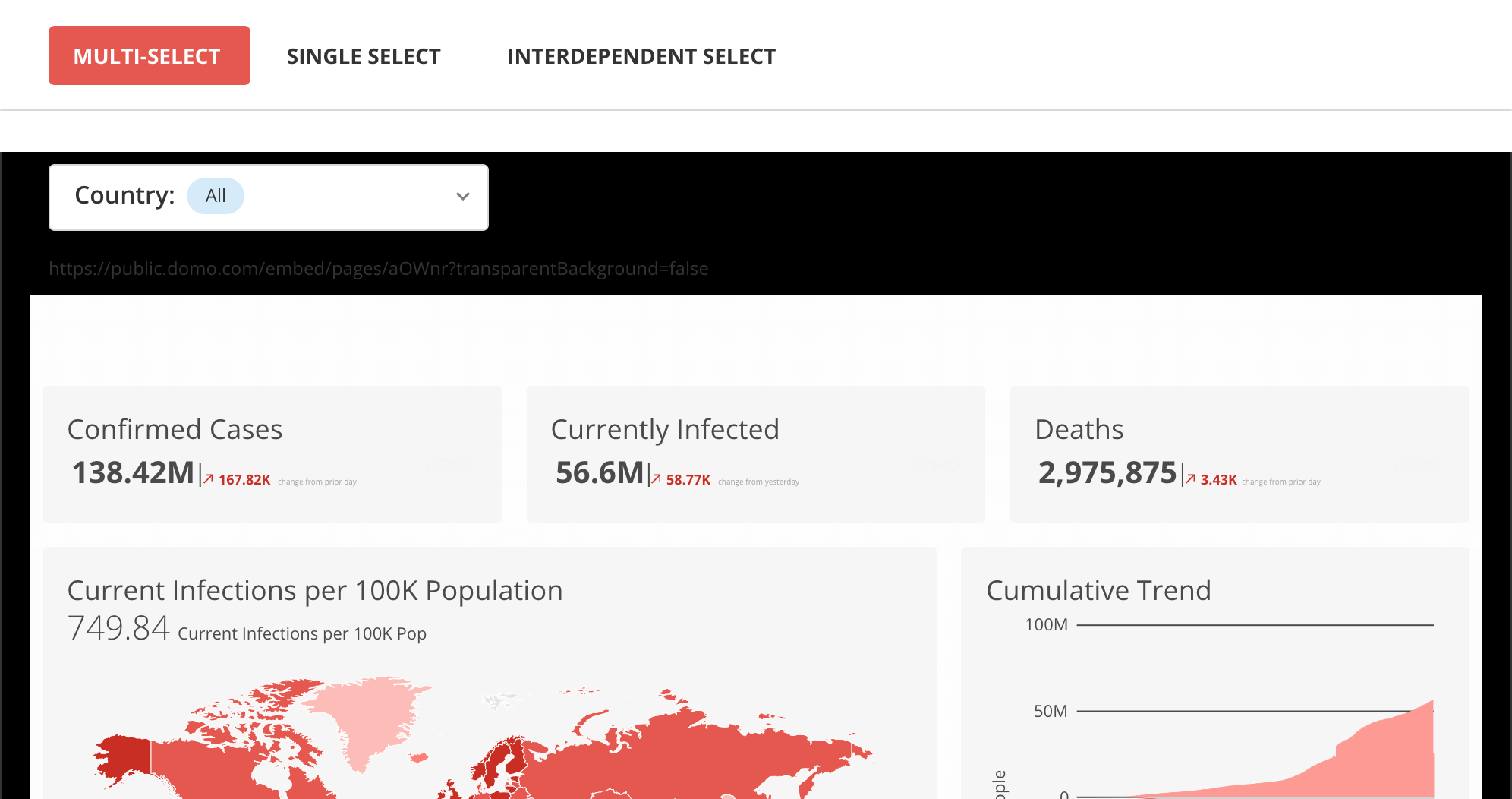
Here is how that same embedded dashboard looks when the background transparency is set to false (?transparentBackground=false)
## PFilters
***
You can use Pfilters (Python particle filters) to apply filters from URL query parameters to embedded Domo Dashboards as a layer after SSO or programmatic filtering.
The Pfilter acts as an array of page filter objects. Any matching column names will be filtered upon page load even if they are based on different DataSets. Results can be validated in POST requests on the network tab.
Review how to link from one embedded dashboard to another while maintaining secure programmatic filters [here](/portal/embed/embed-in-sites-and-apps/programmatic-filtering#linking-across-embedded-dashboards-while-persisting-programmatic-filters).
### Example
The following multi-line example shows Pfilters being used to apply filters to an embedded Domo Dashboard. Note, this example is broken up into multiple lines:
```url theme={"dark"}
example.domo.com/embed/pages/private/ABCDE
?pfilters=[{
"column":"Pos",
"operand":"IN",
"values":["TE","WR"],
},
{
"column":"Location",
"operand":"IN",
"values":["Amsterdam","Anchorage"],
}]
```
### Operands
The operands you can use when writing Pfilters are listed below. The `values` field is always an array (square brackets), even when only a single value is provided.
#### String operands
| Operand | Description | Example |
| -------------------- | ---------------------------------------------------------------------------------------------------------------------- | ----------------------------------------------------------------------------------------------------------------------------------------------------- |
| `IN` | Matches any of the provided values (**case-sensitive**); also works with numeric columns | `?pfilters=[{"column":"Status","operand":"IN","values":["Active","Pending","Closed"]}]` |
| `NOT_IN` | Excludes all of the provided values (**case-sensitive**); also works with numeric columns | `?pfilters=[{"column":"Status","operand":"NOT_IN","values":["Deleted","Archived"]}]` |
| `IN_IGNORE_CASE` | Same as `IN` but case-insensitive | `?pfilters=[{"column":"Region","operand":"IN_IGNORE_CASE","values":["north america"]}]` — also matches "North America" and "NORTH AMERICA" |
| `CONTAINS` | Matches rows where the column contains the substring (**case-insensitive**) | `?pfilters=[{"column":"Title","operand":"CONTAINS","values":["Q4"]}]` — matches "Q4 Report", "TORQ4MOTORS", and "q4 summary" |
| `NOT_CONTAINS` | Matches rows where the column does not contain the substring (**case-insensitive**) | `?pfilters=[{"column":"Title","operand":"NOT_CONTAINS","values":["draft"]}]` — also excludes "Draft" and "DRAFT" |
| `STARTS_WITH` | Matches rows where the column value begins with the string (**case-insensitive**) | `?pfilters=[{"column":"Message","operand":"STARTS_WITH","values":["error"]}]` — matches "Error 404", "ERROR: timeout", and "error occurred" |
| `NOT_STARTS_WITH` | Matches rows where the column value does not begin with the string (**case-insensitive**) | `?pfilters=[{"column":"Name","operand":"NOT_STARTS_WITH","values":["test_"]}]` — also excludes "TEST\_user" |
| `ENDS_WITH` | Matches rows where the column value ends with the string (**case-insensitive**) | `?pfilters=[{"column":"Market","operand":"ENDS_WITH","values":["_us"]}]` — matches "\_US", "\_Us", and "\_us" |
| `NOT_ENDS_WITH` | Matches rows where the column value does not end with the string (**case-insensitive**) | `?pfilters=[{"column":"Config","operand":"NOT_ENDS_WITH","values":["_old"]}]` — also excludes values ending in "\_OLD" or "\_Old" |
| `EQUALS` | **Case-sensitive** exact match (also works for numeric columns) | `?pfilters=[{"column":"Region","operand":"EQUALS","values":["North America"]}]` — "north america" and "NORTH AMERICA" do not match |
| `NOT_EQUALS` | Excludes **case-sensitive** exact match (also works for numeric columns) | `?pfilters=[{"column":"Status","operand":"NOT_EQUALS","values":["N/A"]}]` — "n/a" and "N/a" are not excluded |
| `EQUALS_IGNORE_CASE` | Case-insensitive exact match | `?pfilters=[{"column":"Status","operand":"EQUALS_IGNORE_CASE","values":["active"]}]` — matches "active", "Active", and "ACTIVE" |
| `LIKE` | SQL-style pattern match (`%` = zero or more characters, `_` = exactly one character); **matching is case-insensitive** | `?pfilters=[{"column":"Region","operand":"LIKE","values":["US-__"]}]` — matches "US-CA" and "US-TX" but not "US-C" (too short) or "US-CAL" (too long) |
| `NOT_LIKE` | Excludes rows matching the SQL-style pattern (same wildcards and case-insensitive behavior as `LIKE`) | `?pfilters=[{"column":"Title","operand":"NOT_LIKE","values":["%25archived%25"]}]` — excludes any value containing "archived" |
**URL-encode special characters in `LIKE` and `NOT_LIKE` patterns.** Because pfilters are passed as URL query parameters, the `%` wildcard must be encoded as `%25` — a raw `%` will be misinterpreted as the start of a percent-encoded character and the filter will not work.
**Special characters in the `pfilters` value can be mangled by text tools.** Characters like `[`, `]`, `{`, `}`, `"`, `%`, and `+` appear throughout every pfilter and are meaningful in URLs. Email clients, Markdown renderers, CMS fields, Slack, and spreadsheet tools can silently strip, escape, or re-encode them — producing a URL that looks correct but fails when tried.
URL-encoding the entire value of the `pfilters` parameter sidesteps this: every special character becomes a safe `%XX` sequence that any tool can pass through unchanged.
**Online:** paste your pfilter value into [URLEncoder.org](https://www.urlencoder.org/) and copy the encoded result.
**Locally:** adapt and run the following command in a browser console:
```js theme={"dark"}
copy( encodeURI(`https://embed.domo.com/cards/ABCD?pfilters=[{"column": "Customer Segment", "operand": "IN", "values": ["Home Office"]}, {"column":"Description", "operand":"NOT_LIKE", "values":["%test%"]}]`) )
// https://embed.domo.com/cards/ABCD?pfilters=%5B%7B%22column%22:%20%22Customer%20Segment%22,%20%22operand%22:%20%22IN%22,%20%22values%22:%20%5B%22Home%20Office%22%5D%7D,%20%7B%22column%22:%22Description%22,%20%22operand%22:%22NOT_LIKE%22,%20%22values%22:%5B%22%25test%25%22%5D%7D%5D
```
#### Numeric operands
| Operand | Description | Example |
| ---------------------- | -------------------------------------------------------------------------------------------- | ------------------------------------------------------------------------------------------------------------------------------ |
| `EQUALS` | Exact match against a single numeric value (also listed under string operands) | `?pfilters=[{"column":"Year","operand":"EQUALS","values":[2024]}]` |
| `NOT_EQUALS` | Excludes rows with an exact numeric value (also listed under string operands) | `?pfilters=[{"column":"Year","operand":"NOT_EQUALS","values":[2024]}]` |
| `GREATER_THAN` | Matches rows where the column value is greater than the provided number | `?pfilters=[{"column":"Revenue","operand":"GREATER_THAN","values":[100]}]` |
| `GREAT_THAN_EQUALS_TO` | Matches rows where the column value is greater than or equal to the provided number | `?pfilters=[{"column":"Score","operand":"GREAT_THAN_EQUALS_TO","values":[0]}]` — matches zero and all positive values |
| `LESS_THAN` | Matches rows where the column value is less than the provided number | `?pfilters=[{"column":"Revenue","operand":"LESS_THAN","values":[1000]}]` |
| `LESS_THAN_EQUALS_TO` | Matches rows where the column value is less than or equal to the provided number | `?pfilters=[{"column":"Score","operand":"LESS_THAN_EQUALS_TO","values":[100]}]` |
| `BETWEEN` | Matches rows where the column value falls within the range (inclusive) — requires two values | `?pfilters=[{"column":"Revenue","operand":"BETWEEN","values":[1000,5000]}]` — matches 1000, 2500, and 5000 but not 999 or 5001 |
| `NOT_BETWEEN` | Matches rows where the column value falls outside the range — requires two values | `?pfilters=[{"column":"Score","operand":"NOT_BETWEEN","values":[0,10]}]` — matches anything below 0 or above 10 |
### Combining multiple operands
To apply more than one filter at once, add multiple objects to the `pfilters` array:
```text theme={"dark"}
?pfilters=[{"column":"Status","operand":"IN","values":["Active","Pending"]},{"column":"Score","operand":"GREATER_THAN","values":[50]}]
```
### Persistence of Pfilters across Pages
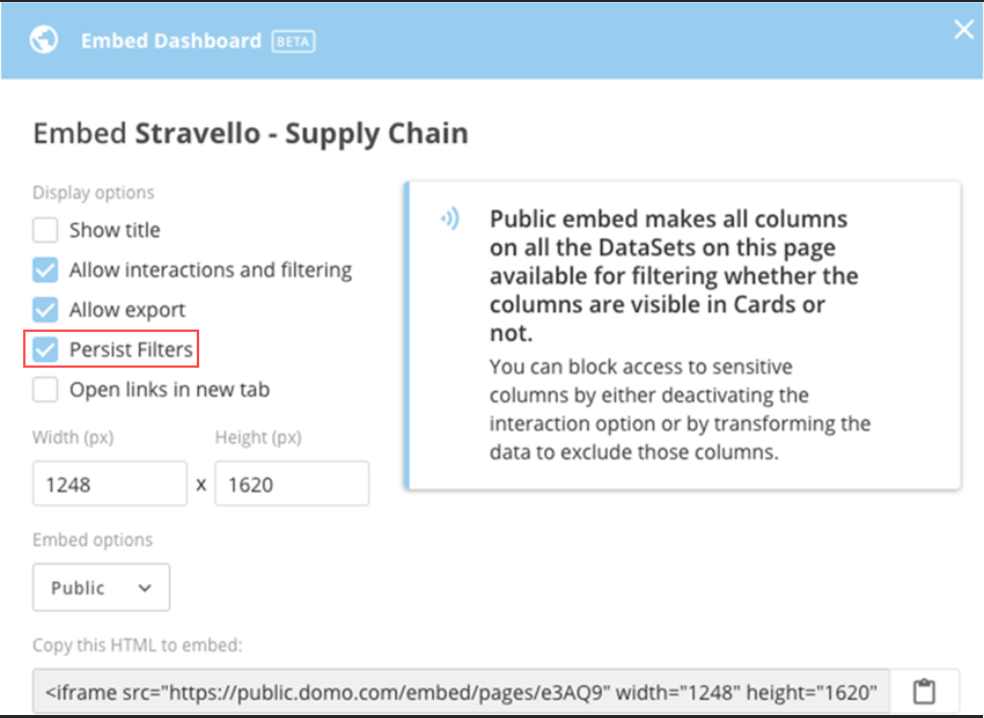
Domo automatically creates Pfilters when you check Persist Filters in the embed dialog, as shown here:
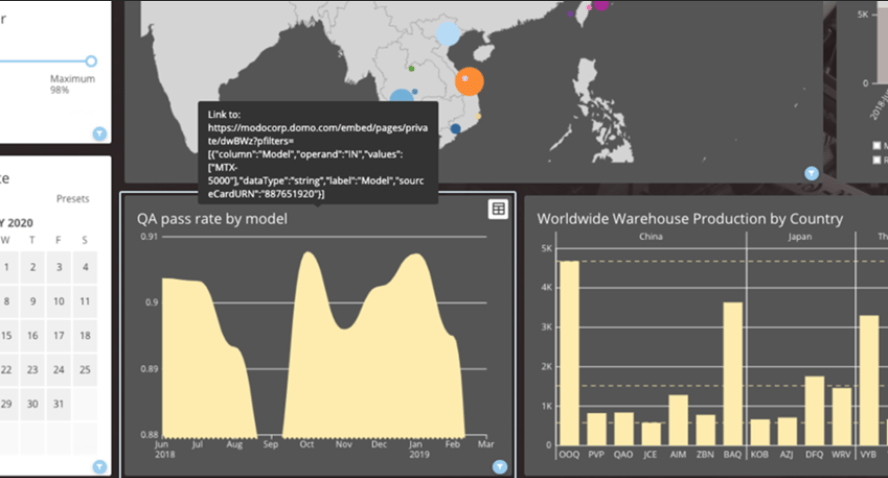
You can then view the parameters by hovering over the content. (Card interactions must be turned on and set to External link for this to work). This is shown for the "QA pass rate by model" Card in the following example:
When viewers click those links, any parts of the story they had previously clicked will be passed along as Pfilters to the next Page. These filters can either be applied to single Cards or complete Pages (even if the Pages contain many Cards based on various DataSets).
### Persistence of Pfilters across sessions
If you want Pfilters to expand beyond pages to also persist across sessions and refreshes, you'll need to store and load the last known state of the Pfilters. One way to do this is through AppDB.
### Malformed criteria
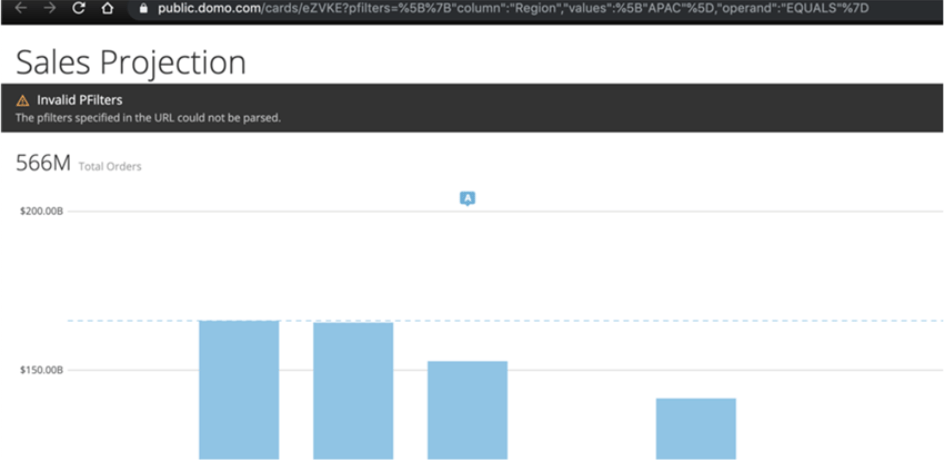
If a Pfilter is written incorrectly, the unfiltered version renders and a black error bar appears.
## AppData
***
The appData parameter supports passing in general types of inputs to the app. The app developer needs to watch for the parameter, parse the value, and inject it into the most relevant part of the app.
For example, the value of the parameter could then auto-populate a drop-down menu in an app that selects the location. This way, the host page can avoid the delay of waiting for manual inputs. They can now deep-link to a version of the app that already has specific values filled in. Spaces should be encoded as "+" :
```html theme={"dark"}
public.domo.com/embed/pages/abcde?appData=Salt+Lake+City
```
The query parameters on the embed URL will then be automatically passed down into the apps (e.g. xyz.domoapps.prod4.domo.com) contained by the embedded cards or dashboards.
## ViewId
***
App Studio includes many navigatable page views, for control outside of the embeded App Studio app, a viewId can be provided in the URL to tell the app a specific page view to open to directly instead of the default landing page view. As well as this parameter can be used by programmatic filter calls to prevent reloading and ensure the page opens to the page that the filter was set.
To find these view ids, when opening an embedded page, looking at the network traffic, the views can be found in the following request `https://embed.domo.com/embed/app-studio/
 With this URL parameter, making the background totally transparent can make embedded content seem even more native to the host page.
Here is how an embedded dashboard looks when the background is the host page is black and the URL parameter is set to true (?transparentBackground=true)
With this URL parameter, making the background totally transparent can make embedded content seem even more native to the host page.
Here is how an embedded dashboard looks when the background is the host page is black and the URL parameter is set to true (?transparentBackground=true)
 Here is how that same embedded dashboard looks when the background transparency is set to false (?transparentBackground=false)
 ## PFilters
***
You can use Pfilters (Python particle filters) to apply filters from URL query parameters to embedded Domo Dashboards as a layer after SSO or programmatic filtering.
The Pfilter acts as an array of page filter objects. Any matching column names will be filtered upon page load even if they are based on different DataSets. Results can be validated in POST requests on the network tab.
Review how to link from one embedded dashboard to another while maintaining secure programmatic filters [here](/portal/embed/embed-in-sites-and-apps/programmatic-filtering#linking-across-embedded-dashboards-while-persisting-programmatic-filters).
### Example
The following multi-line example shows Pfilters being used to apply filters to an embedded Domo Dashboard. Note, this example is broken up into multiple lines:
```url theme={"dark"}
example.domo.com/embed/pages/private/ABCDE
?pfilters=[{
"column":"Pos",
"operand":"IN",
"values":["TE","WR"],
},
{
"column":"Location",
"operand":"IN",
"values":["Amsterdam","Anchorage"],
}]
```
### Operands
The operands you can use when writing Pfilters are listed below. The `values` field is always an array (square brackets), even when only a single value is provided.
#### String operands
| Operand | Description | Example |
| -------------------- | ---------------------------------------------------------------------------------------------------------------------- | ----------------------------------------------------------------------------------------------------------------------------------------------------- |
| `IN` | Matches any of the provided values (**case-sensitive**); also works with numeric columns | `?pfilters=[{"column":"Status","operand":"IN","values":["Active","Pending","Closed"]}]` |
| `NOT_IN` | Excludes all of the provided values (**case-sensitive**); also works with numeric columns | `?pfilters=[{"column":"Status","operand":"NOT_IN","values":["Deleted","Archived"]}]` |
| `IN_IGNORE_CASE` | Same as `IN` but case-insensitive | `?pfilters=[{"column":"Region","operand":"IN_IGNORE_CASE","values":["north america"]}]` — also matches "North America" and "NORTH AMERICA" |
| `CONTAINS` | Matches rows where the column contains the substring (**case-insensitive**) | `?pfilters=[{"column":"Title","operand":"CONTAINS","values":["Q4"]}]` — matches "Q4 Report", "TORQ4MOTORS", and "q4 summary" |
| `NOT_CONTAINS` | Matches rows where the column does not contain the substring (**case-insensitive**) | `?pfilters=[{"column":"Title","operand":"NOT_CONTAINS","values":["draft"]}]` — also excludes "Draft" and "DRAFT" |
| `STARTS_WITH` | Matches rows where the column value begins with the string (**case-insensitive**) | `?pfilters=[{"column":"Message","operand":"STARTS_WITH","values":["error"]}]` — matches "Error 404", "ERROR: timeout", and "error occurred" |
| `NOT_STARTS_WITH` | Matches rows where the column value does not begin with the string (**case-insensitive**) | `?pfilters=[{"column":"Name","operand":"NOT_STARTS_WITH","values":["test_"]}]` — also excludes "TEST\_user" |
| `ENDS_WITH` | Matches rows where the column value ends with the string (**case-insensitive**) | `?pfilters=[{"column":"Market","operand":"ENDS_WITH","values":["_us"]}]` — matches "\_US", "\_Us", and "\_us" |
| `NOT_ENDS_WITH` | Matches rows where the column value does not end with the string (**case-insensitive**) | `?pfilters=[{"column":"Config","operand":"NOT_ENDS_WITH","values":["_old"]}]` — also excludes values ending in "\_OLD" or "\_Old" |
| `EQUALS` | **Case-sensitive** exact match (also works for numeric columns) | `?pfilters=[{"column":"Region","operand":"EQUALS","values":["North America"]}]` — "north america" and "NORTH AMERICA" do not match |
| `NOT_EQUALS` | Excludes **case-sensitive** exact match (also works for numeric columns) | `?pfilters=[{"column":"Status","operand":"NOT_EQUALS","values":["N/A"]}]` — "n/a" and "N/a" are not excluded |
| `EQUALS_IGNORE_CASE` | Case-insensitive exact match | `?pfilters=[{"column":"Status","operand":"EQUALS_IGNORE_CASE","values":["active"]}]` — matches "active", "Active", and "ACTIVE" |
| `LIKE` | SQL-style pattern match (`%` = zero or more characters, `_` = exactly one character); **matching is case-insensitive** | `?pfilters=[{"column":"Region","operand":"LIKE","values":["US-__"]}]` — matches "US-CA" and "US-TX" but not "US-C" (too short) or "US-CAL" (too long) |
| `NOT_LIKE` | Excludes rows matching the SQL-style pattern (same wildcards and case-insensitive behavior as `LIKE`) | `?pfilters=[{"column":"Title","operand":"NOT_LIKE","values":["%25archived%25"]}]` — excludes any value containing "archived" |
## PFilters
***
You can use Pfilters (Python particle filters) to apply filters from URL query parameters to embedded Domo Dashboards as a layer after SSO or programmatic filtering.
The Pfilter acts as an array of page filter objects. Any matching column names will be filtered upon page load even if they are based on different DataSets. Results can be validated in POST requests on the network tab.
Review how to link from one embedded dashboard to another while maintaining secure programmatic filters [here](/portal/embed/embed-in-sites-and-apps/programmatic-filtering#linking-across-embedded-dashboards-while-persisting-programmatic-filters).
### Example
The following multi-line example shows Pfilters being used to apply filters to an embedded Domo Dashboard. Note, this example is broken up into multiple lines:
```url theme={"dark"}
example.domo.com/embed/pages/private/ABCDE
?pfilters=[{
"column":"Pos",
"operand":"IN",
"values":["TE","WR"],
},
{
"column":"Location",
"operand":"IN",
"values":["Amsterdam","Anchorage"],
}]
```
### Operands
The operands you can use when writing Pfilters are listed below. The `values` field is always an array (square brackets), even when only a single value is provided.
#### String operands
| Operand | Description | Example |
| -------------------- | ---------------------------------------------------------------------------------------------------------------------- | ----------------------------------------------------------------------------------------------------------------------------------------------------- |
| `IN` | Matches any of the provided values (**case-sensitive**); also works with numeric columns | `?pfilters=[{"column":"Status","operand":"IN","values":["Active","Pending","Closed"]}]` |
| `NOT_IN` | Excludes all of the provided values (**case-sensitive**); also works with numeric columns | `?pfilters=[{"column":"Status","operand":"NOT_IN","values":["Deleted","Archived"]}]` |
| `IN_IGNORE_CASE` | Same as `IN` but case-insensitive | `?pfilters=[{"column":"Region","operand":"IN_IGNORE_CASE","values":["north america"]}]` — also matches "North America" and "NORTH AMERICA" |
| `CONTAINS` | Matches rows where the column contains the substring (**case-insensitive**) | `?pfilters=[{"column":"Title","operand":"CONTAINS","values":["Q4"]}]` — matches "Q4 Report", "TORQ4MOTORS", and "q4 summary" |
| `NOT_CONTAINS` | Matches rows where the column does not contain the substring (**case-insensitive**) | `?pfilters=[{"column":"Title","operand":"NOT_CONTAINS","values":["draft"]}]` — also excludes "Draft" and "DRAFT" |
| `STARTS_WITH` | Matches rows where the column value begins with the string (**case-insensitive**) | `?pfilters=[{"column":"Message","operand":"STARTS_WITH","values":["error"]}]` — matches "Error 404", "ERROR: timeout", and "error occurred" |
| `NOT_STARTS_WITH` | Matches rows where the column value does not begin with the string (**case-insensitive**) | `?pfilters=[{"column":"Name","operand":"NOT_STARTS_WITH","values":["test_"]}]` — also excludes "TEST\_user" |
| `ENDS_WITH` | Matches rows where the column value ends with the string (**case-insensitive**) | `?pfilters=[{"column":"Market","operand":"ENDS_WITH","values":["_us"]}]` — matches "\_US", "\_Us", and "\_us" |
| `NOT_ENDS_WITH` | Matches rows where the column value does not end with the string (**case-insensitive**) | `?pfilters=[{"column":"Config","operand":"NOT_ENDS_WITH","values":["_old"]}]` — also excludes values ending in "\_OLD" or "\_Old" |
| `EQUALS` | **Case-sensitive** exact match (also works for numeric columns) | `?pfilters=[{"column":"Region","operand":"EQUALS","values":["North America"]}]` — "north america" and "NORTH AMERICA" do not match |
| `NOT_EQUALS` | Excludes **case-sensitive** exact match (also works for numeric columns) | `?pfilters=[{"column":"Status","operand":"NOT_EQUALS","values":["N/A"]}]` — "n/a" and "N/a" are not excluded |
| `EQUALS_IGNORE_CASE` | Case-insensitive exact match | `?pfilters=[{"column":"Status","operand":"EQUALS_IGNORE_CASE","values":["active"]}]` — matches "active", "Active", and "ACTIVE" |
| `LIKE` | SQL-style pattern match (`%` = zero or more characters, `_` = exactly one character); **matching is case-insensitive** | `?pfilters=[{"column":"Region","operand":"LIKE","values":["US-__"]}]` — matches "US-CA" and "US-TX" but not "US-C" (too short) or "US-CAL" (too long) |
| `NOT_LIKE` | Excludes rows matching the SQL-style pattern (same wildcards and case-insensitive behavior as `LIKE`) | `?pfilters=[{"column":"Title","operand":"NOT_LIKE","values":["%25archived%25"]}]` — excludes any value containing "archived" |
 You can then view the parameters by hovering over the content. (Card interactions must be turned on and set to External link for this to work). This is shown for the "QA pass rate by model" Card in the following example:
 When viewers click those links, any parts of the story they had previously clicked will be passed along as Pfilters to the next Page. These filters can either be applied to single Cards or complete Pages (even if the Pages contain many Cards based on various DataSets).
 ### Persistence of Pfilters across sessions
If you want Pfilters to expand beyond pages to also persist across sessions and refreshes, you'll need to store and load the last known state of the Pfilters. One way to do this is through AppDB.
### Malformed criteria
If a Pfilter is written incorrectly, the unfiltered version renders and a black error bar appears.
### Persistence of Pfilters across sessions
If you want Pfilters to expand beyond pages to also persist across sessions and refreshes, you'll need to store and load the last known state of the Pfilters. One way to do this is through AppDB.
### Malformed criteria
If a Pfilter is written incorrectly, the unfiltered version renders and a black error bar appears.
 ## AppData
***
The appData parameter supports passing in general types of inputs to the app. The app developer needs to watch for the parameter, parse the value, and inject it into the most relevant part of the app.
For example, the value of the parameter could then auto-populate a drop-down menu in an app that selects the location. This way, the host page can avoid the delay of waiting for manual inputs. They can now deep-link to a version of the app that already has specific values filled in. Spaces should be encoded as "+" :
```html theme={"dark"}
public.domo.com/embed/pages/abcde?appData=Salt+Lake+City
```
The query parameters on the embed URL will then be automatically passed down into the apps (e.g. xyz.domoapps.prod4.domo.com) contained by the embedded cards or dashboards.
## ViewId
***
App Studio includes many navigatable page views, for control outside of the embeded App Studio app, a viewId can be provided in the URL to tell the app a specific page view to open to directly instead of the default landing page view. As well as this parameter can be used by programmatic filter calls to prevent reloading and ensure the page opens to the page that the filter was set.
To find these view ids, when opening an embedded page, looking at the network traffic, the views can be found in the following request `https://embed.domo.com/embed/app-studio/
## AppData
***
The appData parameter supports passing in general types of inputs to the app. The app developer needs to watch for the parameter, parse the value, and inject it into the most relevant part of the app.
For example, the value of the parameter could then auto-populate a drop-down menu in an app that selects the location. This way, the host page can avoid the delay of waiting for manual inputs. They can now deep-link to a version of the app that already has specific values filled in. Spaces should be encoded as "+" :
```html theme={"dark"}
public.domo.com/embed/pages/abcde?appData=Salt+Lake+City
```
The query parameters on the embed URL will then be automatically passed down into the apps (e.g. xyz.domoapps.prod4.domo.com) contained by the embedded cards or dashboards.
## ViewId
***
App Studio includes many navigatable page views, for control outside of the embeded App Studio app, a viewId can be provided in the URL to tell the app a specific page view to open to directly instead of the default landing page view. As well as this parameter can be used by programmatic filter calls to prevent reloading and ensure the page opens to the page that the filter was set.
To find these view ids, when opening an embedded page, looking at the network traffic, the views can be found in the following request `https://embed.domo.com/embed/app-studio/