> ## Documentation Index
> Fetch the complete documentation index at: https://domoinc-bradley-turek-pfilter-operators-reference.mintlify.site/llms.txt
> Use this file to discover all available pages before exploring further.
# Credit Monitoring
## Intro
To help you feel confident about how your consumption credits are being used, we have created a set of tools for transparency:
**Note:** To learn more about consumption, see [What Are Consumption Credits and How Do They Work?](/articles/en_US/Knowledge/000005280) and the [Consumption Terms](https://www.domo.com/consumption-terms) .
***
## Credit Utilization
The **Credit Utilization** interface contains four main tools: [Used Credits](#used-credits-tab), [Credit Balance](#credit-balance-tab), [Subscription details,](#subscription) and Rate Card. The interface is only available in your primary instance of Domo and is automatically visible to administrators. Other viewers who need access to the interface must have the [required grant](#required-grant).
**Note:** If you have one primary instance and any number of sub-instances, all reporting is aggregated to the **Credit Utilization** page in your primary instance.
All consumption calculations and aggregations are done using the UTC time zone. The data is updated once per day.
##### Required Grant
To access the **Credit Utilization** interface and associated features in the company settings, you must have the following grant:
**View Credit Reports —** Allows the user to access the **Credit Utilization** interface. This grant can be added to a custom role. By default, this grant is enabled for Admin users.
To learn more about custom roles and grants, see [Managing Custom Roles](/articles/en_US/Knowledge/360043438973).
### Access Credit Utilization
If you have the required grant, you can access **Credit Utilization** by following these steps:
1. In the navigation header, select **More** > **Admin**.\
The Admin Settings display.
2. Under **Company settings**, select **Credit Utilization**to display the interface.
3. Select one of the four tabs, [**Used Credits**](#used-credits-tab), [**Credit Balance**](#credit-balance-tab), [#subscription](#subscription)**[Subscription](#subscription)**, or Rate Card,to move to that tool. You can learn about these tabs below.
#### Used Credits Tab
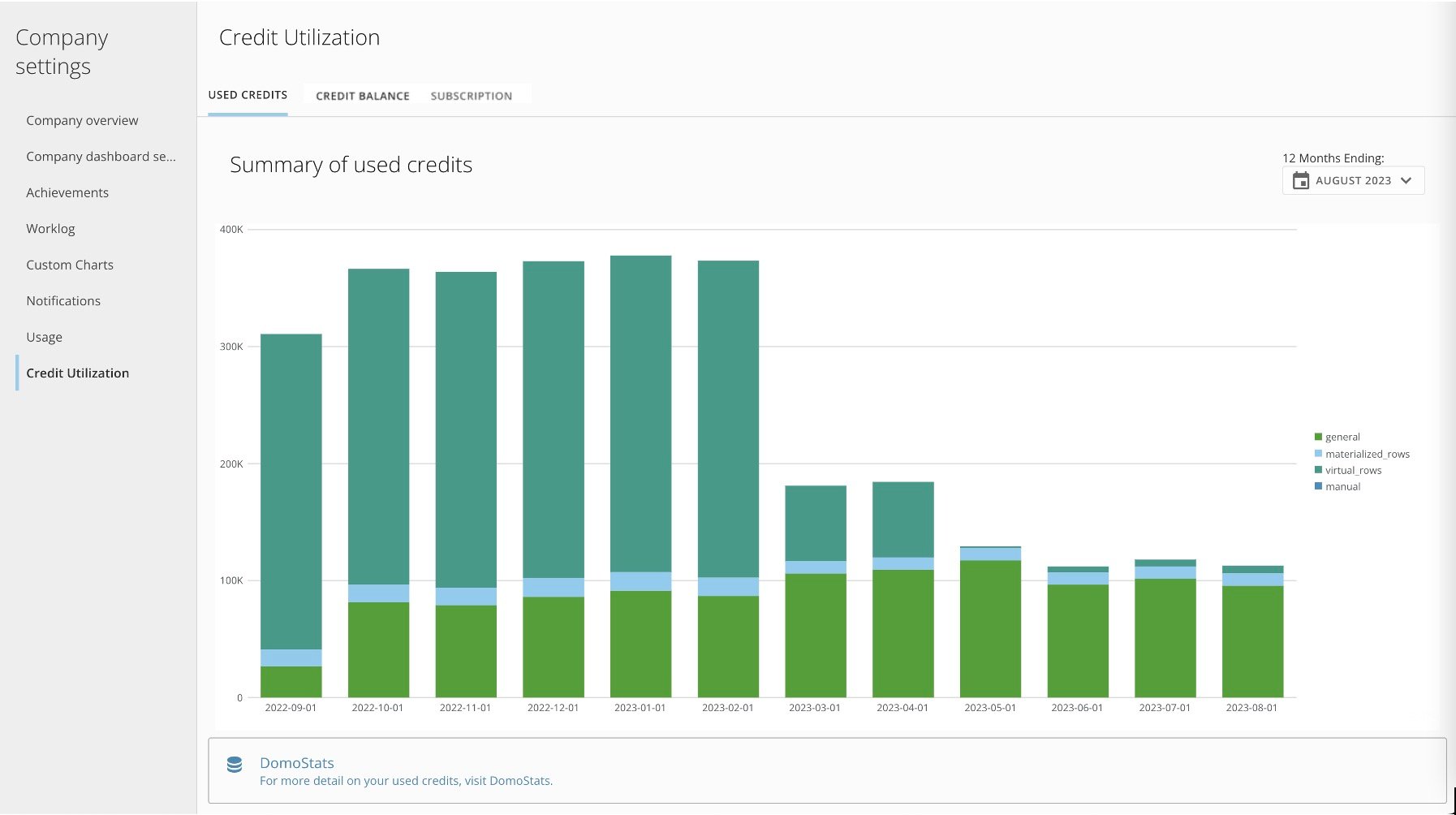
In the **Used Credits** tab, you can see a summary of your used credits and sort by timeframe.
.
***
## Credit Utilization
The **Credit Utilization** interface contains four main tools: [Used Credits](#used-credits-tab), [Credit Balance](#credit-balance-tab), [Subscription details,](#subscription) and Rate Card. The interface is only available in your primary instance of Domo and is automatically visible to administrators. Other viewers who need access to the interface must have the [required grant](#required-grant).
**Note:** If you have one primary instance and any number of sub-instances, all reporting is aggregated to the **Credit Utilization** page in your primary instance.
All consumption calculations and aggregations are done using the UTC time zone. The data is updated once per day.
##### Required Grant
To access the **Credit Utilization** interface and associated features in the company settings, you must have the following grant:
**View Credit Reports —** Allows the user to access the **Credit Utilization** interface. This grant can be added to a custom role. By default, this grant is enabled for Admin users.
To learn more about custom roles and grants, see [Managing Custom Roles](/articles/en_US/Knowledge/360043438973).
### Access Credit Utilization
If you have the required grant, you can access **Credit Utilization** by following these steps:
1. In the navigation header, select **More** > **Admin**.\
The Admin Settings display.
2. Under **Company settings**, select **Credit Utilization**to display the interface.
3. Select one of the four tabs, [**Used Credits**](#used-credits-tab), [**Credit Balance**](#credit-balance-tab), [#subscription](#subscription)**[Subscription](#subscription)**, or Rate Card,to move to that tool. You can learn about these tabs below.
#### Used Credits Tab
In the **Used Credits** tab, you can see a summary of your used credits and sort by timeframe.
 #### Credit Balance Tab
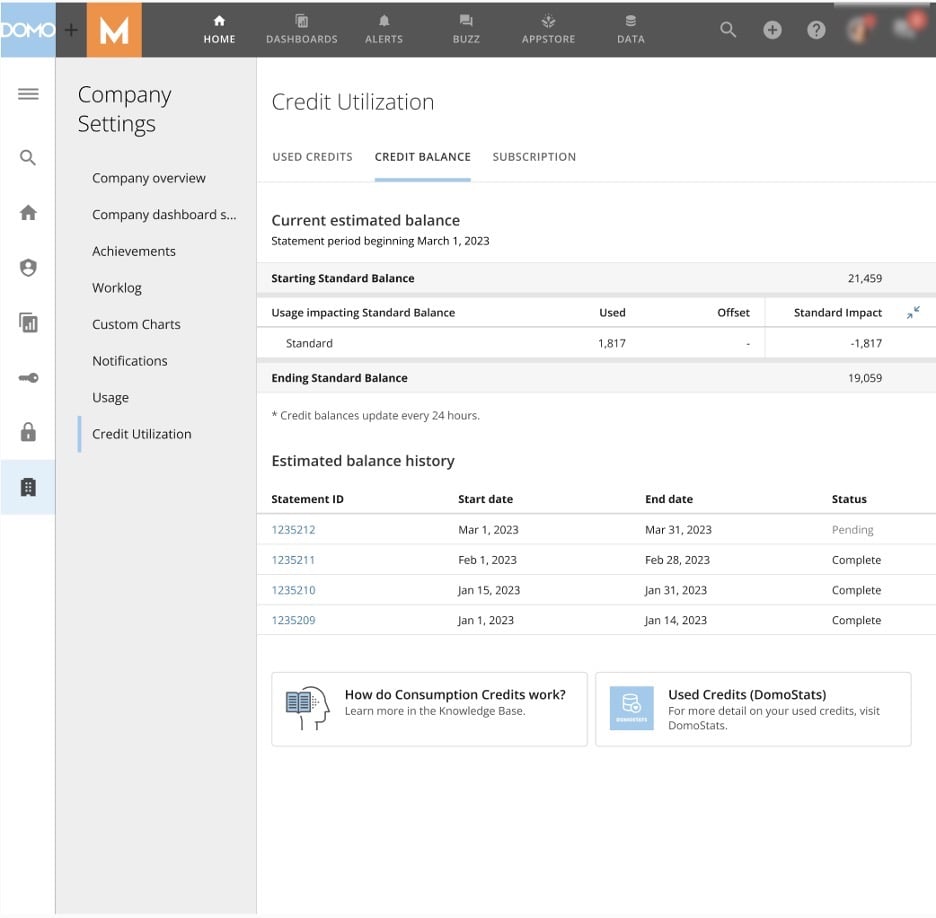
The **Credit Balance** tab has two sections: **Current estimated balance** and **Estimated balance history**.
The Current Estimated Balance is divided by contract period to provide visibility. Balances display for Used, Offset, and Standard Impact.
The balances are defined as follows:
* **Used —** Indicates the credits that were accrued and used.
* **Offset —** Indicates any contract-allowed usage of credits for that allotted type.
* **Standard Impact —** Indicates the impact of this credit category against standard credit allocation. In the case of excess credits in a specific category, standard credits are used as overage protection.
The Estimated Balance History provides a place to track balance history by usage period. You can select a balance period statement ID to view the balance for that period.
#### Credit Balance Tab
The **Credit Balance** tab has two sections: **Current estimated balance** and **Estimated balance history**.
The Current Estimated Balance is divided by contract period to provide visibility. Balances display for Used, Offset, and Standard Impact.
The balances are defined as follows:
* **Used —** Indicates the credits that were accrued and used.
* **Offset —** Indicates any contract-allowed usage of credits for that allotted type.
* **Standard Impact —** Indicates the impact of this credit category against standard credit allocation. In the case of excess credits in a specific category, standard credits are used as overage protection.
The Estimated Balance History provides a place to track balance history by usage period. You can select a balance period statement ID to view the balance for that period.
 #### Subscription Tab
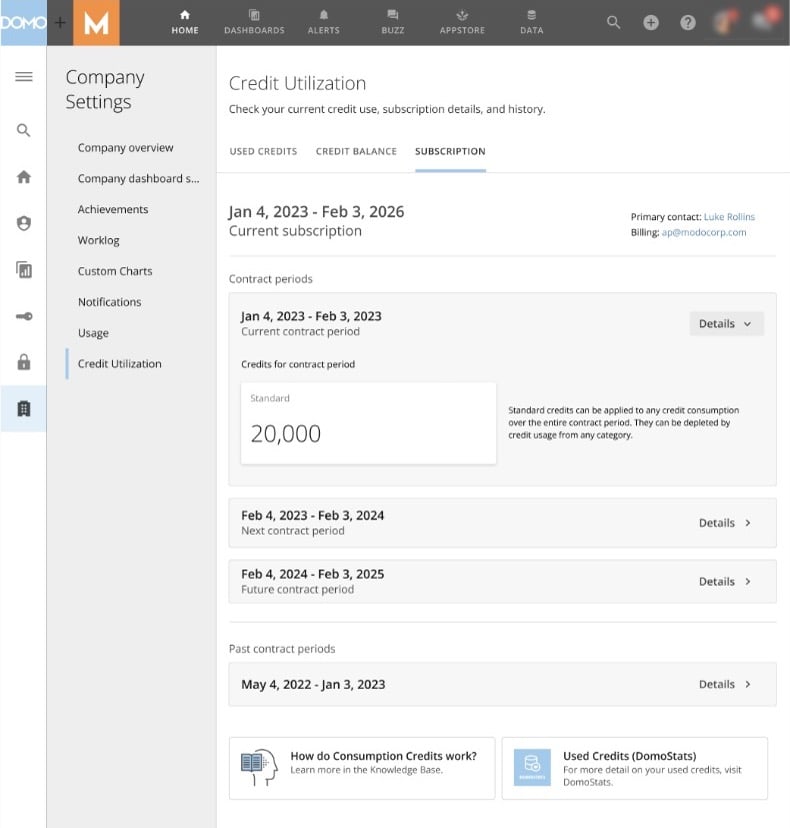
In the **Subscription** tab, you can see an overview of your contract: the start and end dates, the contracted allocation of credits, your plan type, and contracted period dates.
#### Subscription Tab
In the **Subscription** tab, you can see an overview of your contract: the start and end dates, the contracted allocation of credits, your plan type, and contracted period dates.
 #### Rate Card Tab
In the **Rate Card** tab, you can see lists of SKUs related to the usage of Domo AI features—including their unit of measure and [credit rate](#credit-rate). The SKUs and credit rates that you see here reflect your current contract terms.
**Note:** *Credit rate* refers to the number of credits you have consumed per usage unit.
## DomoStats Reports
You can use the DomoStats connector to access detailed credit-usage and credit-utilization data for deeper analysis.
### Credit Usage Report
You access the Credit Usage DomoStats report only from your account's primary Domo instance, where you see raw credit usage data for all instances in your account. The report updates regularly.
**Note:** We also provide a Quickstart Dashboard that provides examples of how to make straightforward visualizations from this data.
#### Rate Card Tab
In the **Rate Card** tab, you can see lists of SKUs related to the usage of Domo AI features—including their unit of measure and [credit rate](#credit-rate). The SKUs and credit rates that you see here reflect your current contract terms.
**Note:** *Credit rate* refers to the number of credits you have consumed per usage unit.
## DomoStats Reports
You can use the DomoStats connector to access detailed credit-usage and credit-utilization data for deeper analysis.
### Credit Usage Report
You access the Credit Usage DomoStats report only from your account's primary Domo instance, where you see raw credit usage data for all instances in your account. The report updates regularly.
**Note:** We also provide a Quickstart Dashboard that provides examples of how to make straightforward visualizations from this data.
 This table describes the fields available in the report:
| Field | Description |
| ------------- | -------------------------------------------------------------------------------------------------------------------------------------------------------------------------------------------------------------------------------------- |
| Date | The date on which the usage occurred. Dates are in UTC format. |
| Month | The month in which the usage occurred. |
| skuGroup | Logical group of SKUs |
| skuId | The SKU that maps to the usage of the line item |
| entityType | The type of entity that incurred the credit usage. Example: dataset |
| entityId | The identifier for the entity. Example: for an entityType `dataset,` the entityId is the DataSet ID. |
| usageUnit | The applicable unit for the line item. |
| usageQuantity | The amount of usage for the line item. |
| category | The applicable category for the used credits |
| creditsUsed | The total credits consumed for the line item. |
| instanceId | The identifier for the instance where consumption occurred for the line item. This identifier does not change in the event of a domain record change. Example: Myexamplecorp.domo.com has a different ID than myexamplecorp5.domo.com |
| domain | The domain of the instance where the consumption occurred for the line item. This may change due to requests to change domain. See *instanceId*. |
### Credit Balance Reports
Use the Credit Balance DomoStats reports to view your monthly balance statement data for your Domo account. You access these reports only in your account's primary Domo instance. The reports refresh daily, and because your contract period may start mid-month, you may see more than one statement in a single calendar month.
### Credit Balance Summary
The Credit Balance Summary report includes the following fields:
| Field | Description |
| ------------------------- | -------------------------------------------------------------------------------------------------------------------------------------------------------------------------------------------------------------------------------------------------------------------------- |
| Statement ID | The ID of the balance statement. The balance statement ID also appears in the Credit Balance tab of the Credit Utilization screen in Admin Settings |
| startDate | The start date of the statement period |
| endDate | The end date of the statement period |
| status | The status of the balance statement: - Pending: The current statement period has status “pending” - Complete: The statement period is complete - Adjusted: The statement period is complete and an adjustment to a credit balance overage was applied to the statement. |
| isFirstForPeriod | Indicates the first statement of the contract period. Some contract changes are accounted for with new contracts, so there may be multiple “first” statements in a year. |
| isFinalForPeriod | Indicates the last statement of the contract period. Some contract changes are accounted for with new contracts, so there may be multiple “final” statements in a year. |
| previousEnd | The ending credit balance as of the prior statement end. |
| balanceStart | The starting balance for the statement period |
| balanceEnd | The ending balance for the statement period |
| balanceEndAfterAdjustment | The ending balance for the statement period, after any balance adjustments |
### Credit Balance Details
The Credit Balance Details report includes the following fields:
| Field | Description |
| ----------------- | ----------------------------------------------------------------------------------------------------------------------------------------------------------------------------------------------------------------------------------------------------------------------------------------------------------------------------------------------------------------------------------------------------------------------------------------------------------------------------------- |
| Statement ID | The ID of the balance statement. The balance statement ID also appears in the Credit Balance tab of the Credit Utilization screen in Admin Settings |
| startDate | The start date of the statement period |
| endDate | The end date of the statement period |
| status | The status of the balance statement: - Pending: The current statement period has status “pending” - Complete: The statement period is complete - Adjusted: The statement period is complete, and an adjustment to a credit balance overage was applied to the statement. |
| entryType | The entry type of the balance line item: - USAGE: Consumption of credits during the statement period - ALLOCATION: Allocation of credits during the statement period - PAST\_PERIOD\_ADJUSTMENT: An adjustment of credit overage was applied. The adjustment was applied to a contract period that had already ended. - CURRENT\_PERIOD\_ADJUSTMENT: An adjustment of credit overage was applied. The adjustment was applied to the contract period during the contract period. |
| creditCategory | Categorization of the usage that contributed to credit consumption |
| transactionDate | For allocations and adjustments only, the date of the allocation or adjustment transaction |
| adjustmentCredits | For standard credit allocations and adjustments only, the number of adjustments or allocated credits |
| usedCredits | Number of credits used in the statement period |
| categoryOffset | For the given credit category, the number of credits that may be consumed before usage begins to impact the Standard credit balance. |
| standardImpact | The number of standard credits consumed by the specific category in the statement period after any applicable caps and offsets. The number of credits deducted from or added to the standard credits balance. |
This table describes the fields available in the report:
| Field | Description |
| ------------- | -------------------------------------------------------------------------------------------------------------------------------------------------------------------------------------------------------------------------------------- |
| Date | The date on which the usage occurred. Dates are in UTC format. |
| Month | The month in which the usage occurred. |
| skuGroup | Logical group of SKUs |
| skuId | The SKU that maps to the usage of the line item |
| entityType | The type of entity that incurred the credit usage. Example: dataset |
| entityId | The identifier for the entity. Example: for an entityType `dataset,` the entityId is the DataSet ID. |
| usageUnit | The applicable unit for the line item. |
| usageQuantity | The amount of usage for the line item. |
| category | The applicable category for the used credits |
| creditsUsed | The total credits consumed for the line item. |
| instanceId | The identifier for the instance where consumption occurred for the line item. This identifier does not change in the event of a domain record change. Example: Myexamplecorp.domo.com has a different ID than myexamplecorp5.domo.com |
| domain | The domain of the instance where the consumption occurred for the line item. This may change due to requests to change domain. See *instanceId*. |
### Credit Balance Reports
Use the Credit Balance DomoStats reports to view your monthly balance statement data for your Domo account. You access these reports only in your account's primary Domo instance. The reports refresh daily, and because your contract period may start mid-month, you may see more than one statement in a single calendar month.
### Credit Balance Summary
The Credit Balance Summary report includes the following fields:
| Field | Description |
| ------------------------- | -------------------------------------------------------------------------------------------------------------------------------------------------------------------------------------------------------------------------------------------------------------------------- |
| Statement ID | The ID of the balance statement. The balance statement ID also appears in the Credit Balance tab of the Credit Utilization screen in Admin Settings |
| startDate | The start date of the statement period |
| endDate | The end date of the statement period |
| status | The status of the balance statement: - Pending: The current statement period has status “pending” - Complete: The statement period is complete - Adjusted: The statement period is complete and an adjustment to a credit balance overage was applied to the statement. |
| isFirstForPeriod | Indicates the first statement of the contract period. Some contract changes are accounted for with new contracts, so there may be multiple “first” statements in a year. |
| isFinalForPeriod | Indicates the last statement of the contract period. Some contract changes are accounted for with new contracts, so there may be multiple “final” statements in a year. |
| previousEnd | The ending credit balance as of the prior statement end. |
| balanceStart | The starting balance for the statement period |
| balanceEnd | The ending balance for the statement period |
| balanceEndAfterAdjustment | The ending balance for the statement period, after any balance adjustments |
### Credit Balance Details
The Credit Balance Details report includes the following fields:
| Field | Description |
| ----------------- | ----------------------------------------------------------------------------------------------------------------------------------------------------------------------------------------------------------------------------------------------------------------------------------------------------------------------------------------------------------------------------------------------------------------------------------------------------------------------------------- |
| Statement ID | The ID of the balance statement. The balance statement ID also appears in the Credit Balance tab of the Credit Utilization screen in Admin Settings |
| startDate | The start date of the statement period |
| endDate | The end date of the statement period |
| status | The status of the balance statement: - Pending: The current statement period has status “pending” - Complete: The statement period is complete - Adjusted: The statement period is complete, and an adjustment to a credit balance overage was applied to the statement. |
| entryType | The entry type of the balance line item: - USAGE: Consumption of credits during the statement period - ALLOCATION: Allocation of credits during the statement period - PAST\_PERIOD\_ADJUSTMENT: An adjustment of credit overage was applied. The adjustment was applied to a contract period that had already ended. - CURRENT\_PERIOD\_ADJUSTMENT: An adjustment of credit overage was applied. The adjustment was applied to the contract period during the contract period. |
| creditCategory | Categorization of the usage that contributed to credit consumption |
| transactionDate | For allocations and adjustments only, the date of the allocation or adjustment transaction |
| adjustmentCredits | For standard credit allocations and adjustments only, the number of adjustments or allocated credits |
| usedCredits | Number of credits used in the statement period |
| categoryOffset | For the given credit category, the number of credits that may be consumed before usage begins to impact the Standard credit balance. |
| standardImpact | The number of standard credits consumed by the specific category in the statement period after any applicable caps and offsets. The number of credits deducted from or added to the standard credits balance. |