> ## Documentation Index
> Fetch the complete documentation index at: https://domoinc-bradley-turek-pfilter-operators-reference.mintlify.site/llms.txt
> Use this file to discover all available pages before exploring further.
# Removing White Space from Text Strings
You can use Magic ETL to remove spaces from text strings.
**To remove spaces from text strings,**
1. Open Magic ETL.
2. For your input DataSet, select the DataSet you want to remove spaces from.
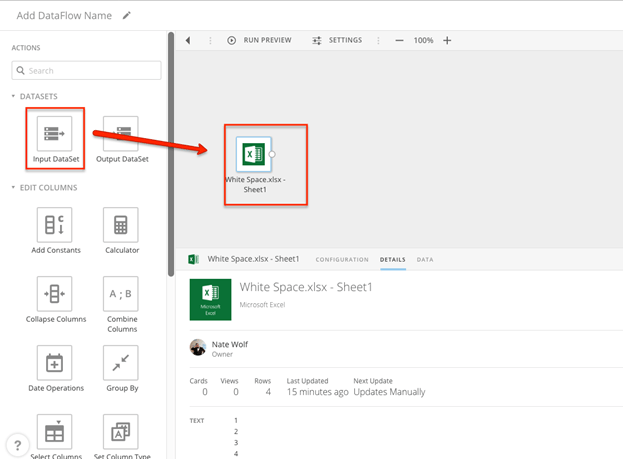 3. Add a "Replace Text" tile.
4. Under **Select a column to search**, select the column you want to remove spaces from.
5. Under **Enter a term to search for**, enter \s.
**Note:** In RegEx \s is the expression for whitespace.
6. Check the box reading **Use RegEx**.
3. Add a "Replace Text" tile.
4. Under **Select a column to search**, select the column you want to remove spaces from.
5. Under **Enter a term to search for**, enter \s.
**Note:** In RegEx \s is the expression for whitespace.
6. Check the box reading **Use RegEx**.
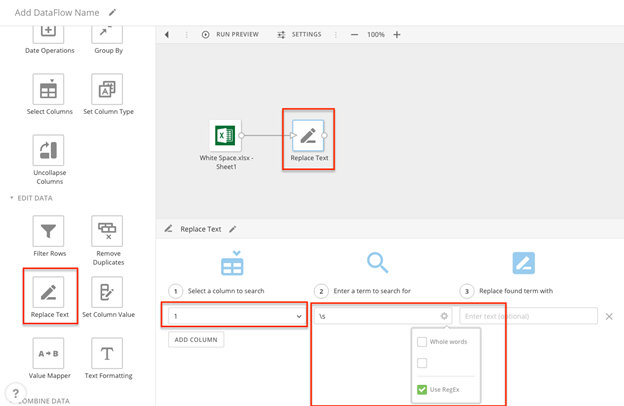 7. Repeat steps 4-6 for all columns that need to be corrected.
8. Click **Done**.
9. Add an output DataSet and name it.
7. Repeat steps 4-6 for all columns that need to be corrected.
8. Click **Done**.
9. Add an output DataSet and name it.
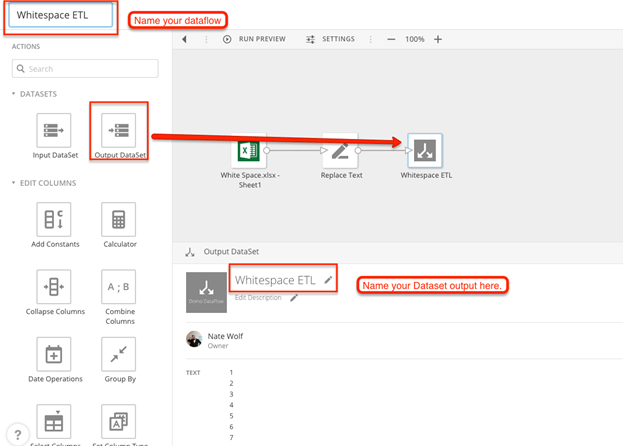 Your output DataSet should incorporate the changes.