> ## Documentation Index
> Fetch the complete documentation index at: https://domoinc-bradley-turek-pfilter-operators-reference.mintlify.site/llms.txt
> Use this file to discover all available pages before exploring further.

# Edit a DataFusion

You can edit a DataFusion in the Data Center. You can only edit a DataFusion if you are the owner OR have an Admin default security role OR a custom role with the Manage DataSet grant enabled. Learn more about [Managing Custom Roles](/s/article/360043438973 "Default Security Role Reference").

Follow these steps to edit a DataFusion:

1. From inside the Data Center, select
   <i className="icon-database sm" aria-hidden="true" /> **DataSets** in the left navigation.
2. Find the DataFusion you want to edit.
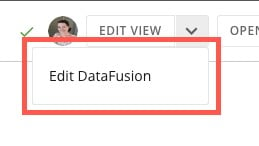
3. Select the DataFusion to open the Details view and select
   <img src="https://mintcdn.com/domoinc-bradley-turek-pfilter-operators-reference/6m8JS4KfWkYB4bxu/images/kb/ka0Vq00000013Ld-00N5w00000Ri7BU-0EMVq000001Q1MU.jpg?fit=max&auto=format&n=6m8JS4KfWkYB4bxu&q=85&s=affd333504a39438e14bc625bb072415" style={{width: 20, height: 20, display: 'inline', verticalAlign: 'start', margin: '0'}} width="32" height="33" data-path="images/kb/ka0Vq00000013Ld-00N5w00000Ri7BU-0EMVq000001Q1MU.jpg" /> **down arrow** > **Edit DataFusion**.

   <Frame>
     <img alt="edit datafusion.jpg" src="https://mintcdn.com/domoinc-bradley-turek-pfilter-operators-reference/6m8JS4KfWkYB4bxu/images/kb/ka0Vq00000013Ld-00N5w00000Ri7BU-0EMVq000001PxkI.jpg?fit=max&auto=format&n=6m8JS4KfWkYB4bxu&q=85&s=a387bae3f339d2b6dfa2c5f27fcbc455" width="259" height="146" data-path="images/kb/ka0Vq00000013Ld-00N5w00000Ri7BU-0EMVq000001PxkI.jpg" />
   </Frame>
4. Update the DataFusion.

<Tip>
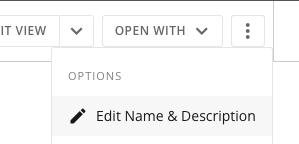
  **Tip:** You can rename a DataFusion by selecting <img src="https://mintcdn.com/domoinc-bradley-turek-pfilter-operators-reference/6m8JS4KfWkYB4bxu/images/kb/ka0Vq00000013Ld-00N5w00000Ri7BU-0EMVq000001Q2f7.jpg?fit=max&auto=format&n=6m8JS4KfWkYB4bxu&q=85&s=b7cb6148a02a791bb53fbf5e66839fae" style={{width: 20, height: 20, display: 'inline', verticalAlign: 'start', margin: '0'}} width="44" height="56" data-path="images/kb/ka0Vq00000013Ld-00N5w00000Ri7BU-0EMVq000001Q2f7.jpg" /> **action menu** > **Edit Name & Description**. Change the title or description of the DataFusion and select **Save**.
  <Frame>
    <img alt="Screenshot 2024-06-19 at 4.20.06 PM.png" src="https://mintcdn.com/domoinc-bradley-turek-pfilter-operators-reference/6m8JS4KfWkYB4bxu/images/kb/ka0Vq00000013Ld-00N5w00000Ri7BU-0EMVq000001Q0oc.jpg?fit=max&auto=format&n=6m8JS4KfWkYB4bxu&q=85&s=e300c17d3289fc7737c5389247dfa5e3" width="299" height="144" data-path="images/kb/ka0Vq00000013Ld-00N5w00000Ri7BU-0EMVq000001Q0oc.jpg" />
  </Frame>
</Tip>