> ## Documentation Index
> Fetch the complete documentation index at: https://domoinc-bradley-turek-pfilter-operators-reference.mintlify.site/llms.txt
> Use this file to discover all available pages before exploring further.
# Content Governance Hub
## Intro
This article explains how to install the Content Governance Hub, identify cards and dashboards that are candidates for archiving, run the archiving and restoration workflows, and customize the archiving criteria.
***
## Understand the Archiving Process
The Content Governance Hub (CGH) is a packaged app and a set of workflows that identify and archive unused content. The app surfaces which objects are candidates for archiving based on criteria such as age, usage, and relevance, and the workflows automate the archiving itself.
The process is divided into two phases: Preparation and Execution.
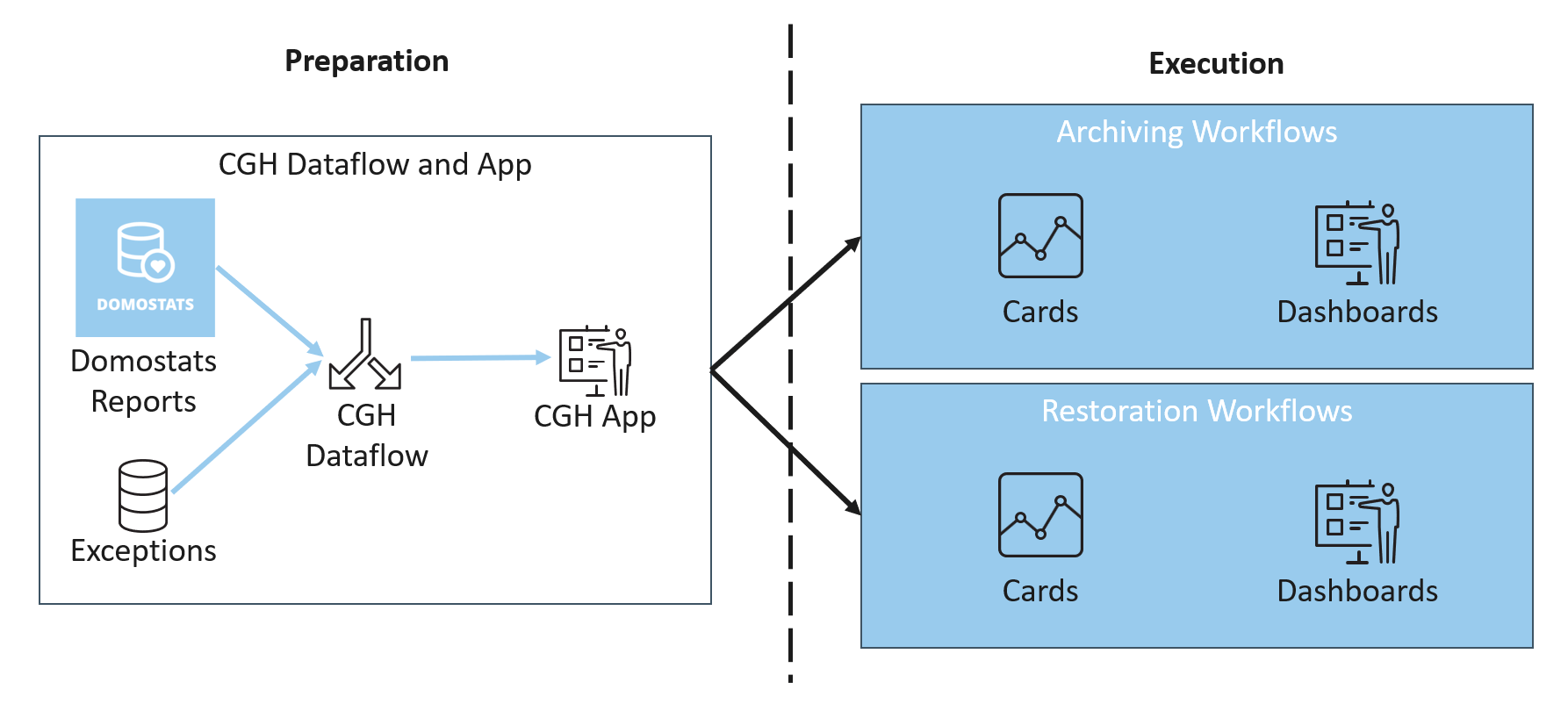 * **Preparation —** DomoStats, Domo Governance DataSets, and an Exceptions DataSet feed into a cleanup DataFlow, which is visualized in the CGH app. The app lets you identify what content needs attention before you start any cleanup tasks.
* **Execution —** The archiving workflows archive dashboards and cards based on the criteria set in the cleanup DataFlow.
The cleanup DataFlow uses predefined conditions to determine which content to archive, and you can customize it to meet your organization's requirements.
## Install the Content Governance Hub
To deploy the Content Governance Hub, contact your Domo account team.
## Identify Content to Archive
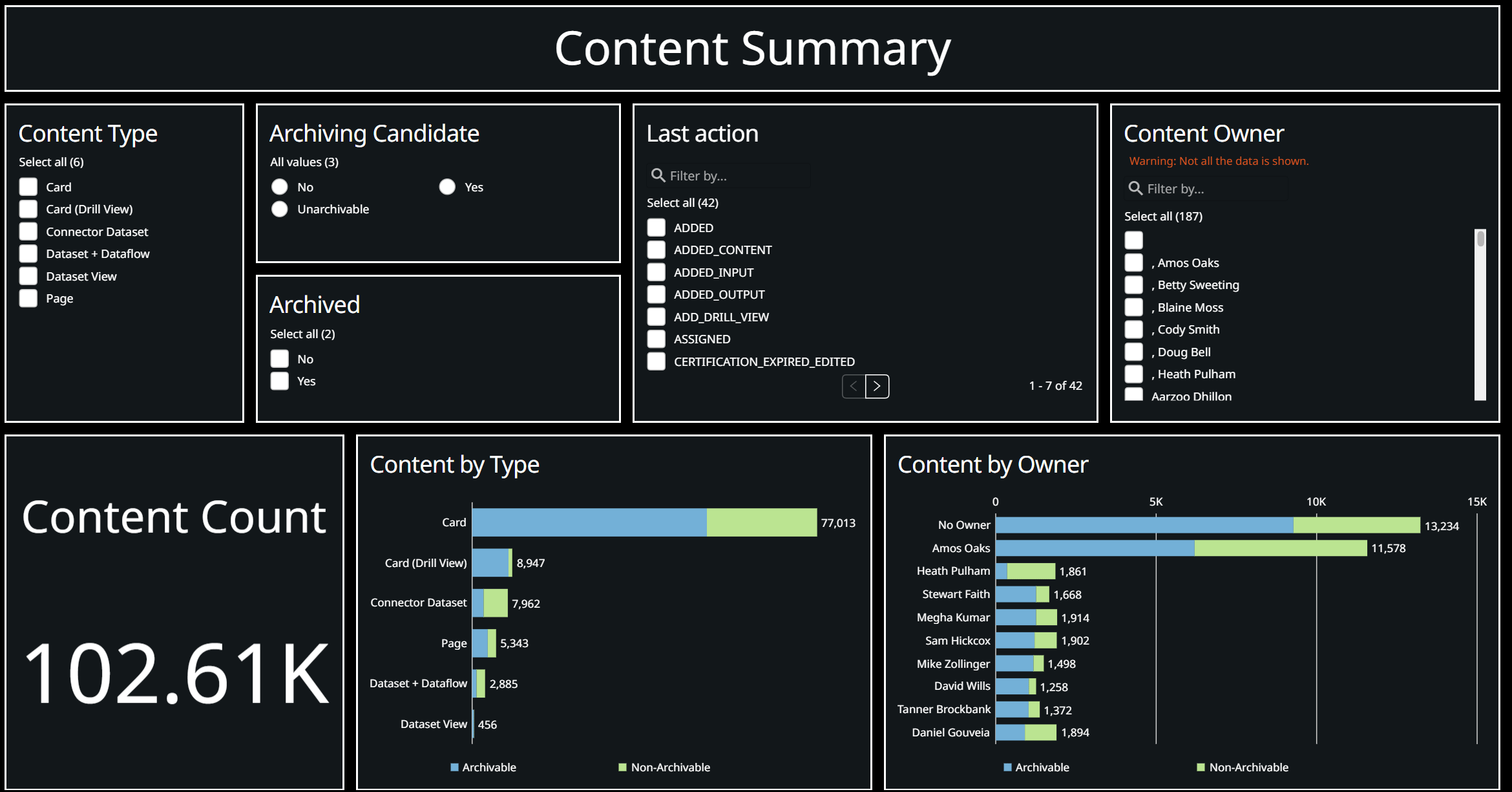
After the archiving DataFlow runs the first time, it populates the CGH app. The **Content Summary** tab identifies content that is eligible for archiving based on the criteria described in [Understand the Cleanup DataFlow](#understand-the-cleanup-dataflow).
* **Preparation —** DomoStats, Domo Governance DataSets, and an Exceptions DataSet feed into a cleanup DataFlow, which is visualized in the CGH app. The app lets you identify what content needs attention before you start any cleanup tasks.
* **Execution —** The archiving workflows archive dashboards and cards based on the criteria set in the cleanup DataFlow.
The cleanup DataFlow uses predefined conditions to determine which content to archive, and you can customize it to meet your organization's requirements.
## Install the Content Governance Hub
To deploy the Content Governance Hub, contact your Domo account team.
## Identify Content to Archive
After the archiving DataFlow runs the first time, it populates the CGH app. The **Content Summary** tab identifies content that is eligible for archiving based on the criteria described in [Understand the Cleanup DataFlow](#understand-the-cleanup-dataflow).
 **Note:** The app highlights DataSets, DataFlows, and connector DataSets as archiving candidates, but archiving these object types is not currently supported. The workflows archive only cards and dashboards.
## Launch and Operate the Workflows
You launch the archiving and restoration workflows from the **Launch Workflows** tab. After deployment, you must trigger the workflows from within the CGH app.
**Note:** The app highlights DataSets, DataFlows, and connector DataSets as archiving candidates, but archiving these object types is not currently supported. The workflows archive only cards and dashboards.
## Launch and Operate the Workflows
You launch the archiving and restoration workflows from the **Launch Workflows** tab. After deployment, you must trigger the workflows from within the CGH app.
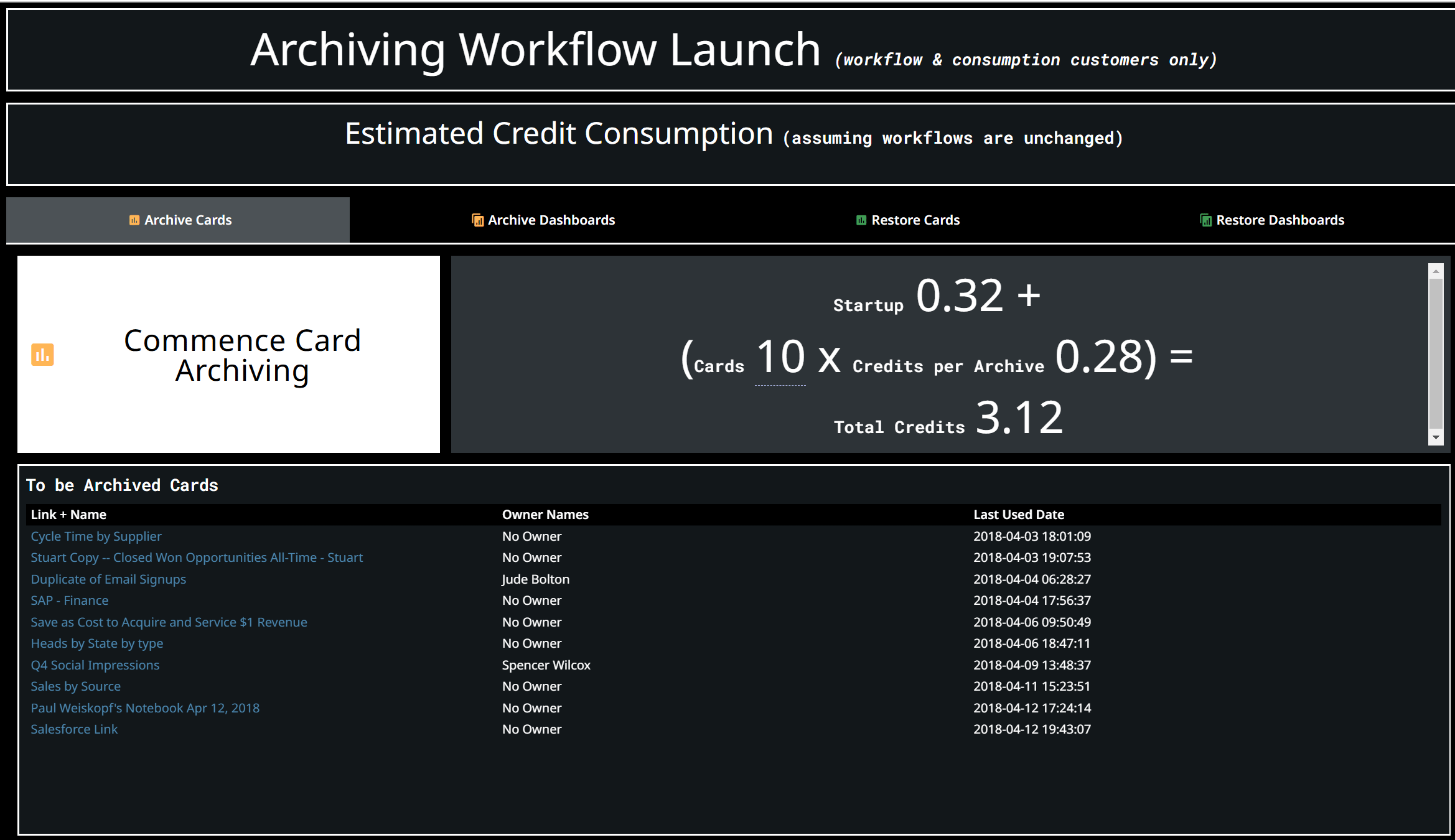 This screen shows the number of credits consumed during archiving, as well as the objects to archive.
**Tip:** Review the content to archive before you run the workflows so that no critical content is archived accidentally. After you change the archiving criteria, run the DataFlow again so that the freshest data is used.
To change which content is archived, see [Customize the Archiving Criteria](#customize-the-archiving-criteria) and [Account for Exceptions](#account-for-exceptions).
## Understand the Cleanup DataFlow
The cleanup DataFlow identifies which content in Domo the workflows archive. It combines multiple DomoStats sources to determine whether a piece of content is unused and should be archived.
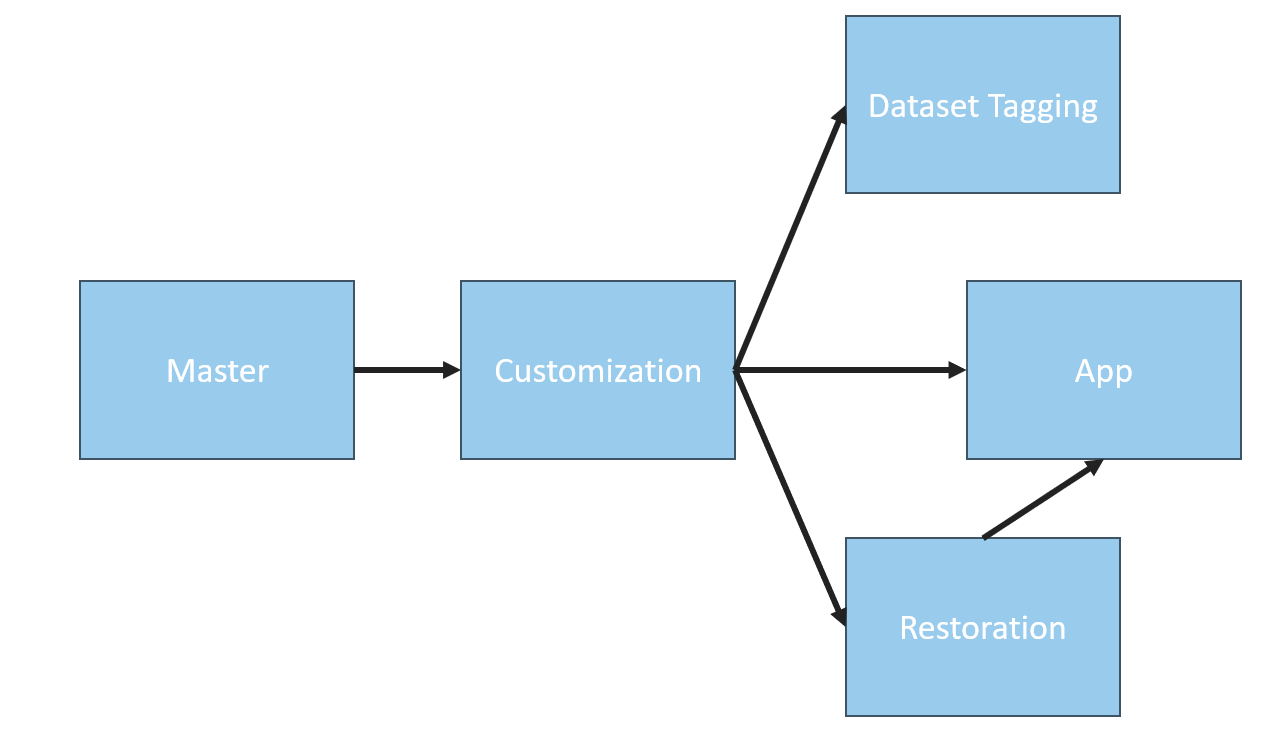
The Content Governance Hub is comprised of four DataFlows along with the app:
* **Master | CGH**
* **Customization | CGH**
* **Restoration | CGH**
* **Dataset Tagging | CGH**
This screen shows the number of credits consumed during archiving, as well as the objects to archive.
**Tip:** Review the content to archive before you run the workflows so that no critical content is archived accidentally. After you change the archiving criteria, run the DataFlow again so that the freshest data is used.
To change which content is archived, see [Customize the Archiving Criteria](#customize-the-archiving-criteria) and [Account for Exceptions](#account-for-exceptions).
## Understand the Cleanup DataFlow
The cleanup DataFlow identifies which content in Domo the workflows archive. It combines multiple DomoStats sources to determine whether a piece of content is unused and should be archived.
The Content Governance Hub is comprised of four DataFlows along with the app:
* **Master | CGH**
* **Customization | CGH**
* **Restoration | CGH**
* **Dataset Tagging | CGH**
 ### Review the Archiving Criteria
The criteria for archiving each type of content varies, though the last-used date is generally the prime factor for determining whether content is active. The following table lists the default criteria. For content to be archived, every criterion must be met unless indicated otherwise.
| Content | Default archiving criteria |
| ------------------------------------- | ---------------------------------------------------------------------------------------------------------------------------------------------------------------------------------------------------------------------------------------------------------------------------------------------------- |
| **Card** | The last-used date is derived from the activity log. No action of any type for the card has occurred in the last 90 days, and no action of any type for the dashboards the card exists on has occurred in the last 90 days. |
| **Dashboard** | The last-used date is derived from the activity log. No action of any type for the dashboard has occurred in the last 90 days. |
| **DataSet + DataFlow / DataSet View** | The last-used date is derived from the activity log. No action except `UPDATED` for the DataSet has occurred in the last 90 days, and the DataSet has no unarchived child cards, DataSet Views, or DataFlows. For an input DataFlow, the same criteria apply to all of its output (linked) DataSets. |
| **Connector DataSet** | No action except `UPDATED` for the DataSet has occurred in the last 90 days, and the DataSet has no child cards, DataSet Views, or DataFlows. |
**Note:** These are the default criteria, but you can customize the DataFlow to change them. The DataFlow already includes many additional attributes you can use. See [Customize the Archiving Criteria](#customize-the-archiving-criteria).
### Review the Additional Available Attributes
The DataFlow loads additional metadata for each content type that it does not use to determine whether the content should be archived. You can modify the DataFlow to include these attributes in the archiving criteria. These attributes are prefixed with `[E]` to indicate that they are extra.
| Content | Additional attributes |
| ---------------------- | --------------------------------------------------------------------------------------------------------------- |
| **Card** | Page ID, Page Name, Scheduled Report, Sandbox Repository, Certified, Alerts |
| **Dashboard** | Scheduled Report, Sandbox Repository, Publish |
| **DataSet + DataFlow** | Sandbox Repository, Certified, Alerts, Import Type, Rows, Archived children, Linked archived children, Children |
| **Connector DataSet** | Import Type, Archived children, Linked archived children, Children |
### Review the Archiving DataSet Dictionary
The following fields are available in the archiving DataSet. The granularity of the DataSet is at the object level with zero duplicates, so some fields are aggregated or refer to the last time the object was used. This is particularly relevant for cards that exist on multiple dashboards or DataSets with multiple children.
| Field name | Description |
| ----------------------------- | ------------------------------------------------------------------------------ |
| Type | Content type, such as Card, Dashboard, DataSet + DataFlow, or Connector. |
| Object ID | Domo ID for the content. |
| Object Name | Domo name for the content. |
| Action | Last type of action from the activity log. |
| Last used date | Last date the content was used. |
| Dataflow ID | ID of the source DataFlow for DataSets. |
| Linked Dataset Last used date | Last-used date of any linked DataSets. |
| Linked Dataset Count | Count of linked DataSets. |
| Unarchived | Count of unarchived children. |
| Linked Unarchived | Count of linked unarchived children. |
| Archiving period | Period of time, defined by the user, after which content is considered unused. |
The following extra attribute fields are also available:
| Field name | Description |
| ------------------ | ---------------------------------------------------------------------------- |
| Page ID | For card objects only. ID of the dashboard the card was on when last used. |
| Page Name | For card objects only. Name of the dashboard the card was on when last used. |
| Scheduled Report | Indicates whether the content is used in a Scheduled Report. |
| Sandbox Repository | Indicates whether the content is used in a Sandbox repository. |
| Certified | Indicates whether the content is certified. |
| Alerts | Indicates the count of alerts on the content. |
| Publish | Indicates whether the content is used by Domo Publish. |
| Import Type | Type of data source. |
| Rows | Row count. |
| Archived | Count of archived children. |
| Linked Archived | Count of linked archived children. |
| Children | Comma-separated list of DataSet children. |
### Understand Linking
The concept of linking comes up several times in the archiving DataSet. The following diagram illustrates what linking means.
### Review the Archiving Criteria
The criteria for archiving each type of content varies, though the last-used date is generally the prime factor for determining whether content is active. The following table lists the default criteria. For content to be archived, every criterion must be met unless indicated otherwise.
| Content | Default archiving criteria |
| ------------------------------------- | ---------------------------------------------------------------------------------------------------------------------------------------------------------------------------------------------------------------------------------------------------------------------------------------------------- |
| **Card** | The last-used date is derived from the activity log. No action of any type for the card has occurred in the last 90 days, and no action of any type for the dashboards the card exists on has occurred in the last 90 days. |
| **Dashboard** | The last-used date is derived from the activity log. No action of any type for the dashboard has occurred in the last 90 days. |
| **DataSet + DataFlow / DataSet View** | The last-used date is derived from the activity log. No action except `UPDATED` for the DataSet has occurred in the last 90 days, and the DataSet has no unarchived child cards, DataSet Views, or DataFlows. For an input DataFlow, the same criteria apply to all of its output (linked) DataSets. |
| **Connector DataSet** | No action except `UPDATED` for the DataSet has occurred in the last 90 days, and the DataSet has no child cards, DataSet Views, or DataFlows. |
**Note:** These are the default criteria, but you can customize the DataFlow to change them. The DataFlow already includes many additional attributes you can use. See [Customize the Archiving Criteria](#customize-the-archiving-criteria).
### Review the Additional Available Attributes
The DataFlow loads additional metadata for each content type that it does not use to determine whether the content should be archived. You can modify the DataFlow to include these attributes in the archiving criteria. These attributes are prefixed with `[E]` to indicate that they are extra.
| Content | Additional attributes |
| ---------------------- | --------------------------------------------------------------------------------------------------------------- |
| **Card** | Page ID, Page Name, Scheduled Report, Sandbox Repository, Certified, Alerts |
| **Dashboard** | Scheduled Report, Sandbox Repository, Publish |
| **DataSet + DataFlow** | Sandbox Repository, Certified, Alerts, Import Type, Rows, Archived children, Linked archived children, Children |
| **Connector DataSet** | Import Type, Archived children, Linked archived children, Children |
### Review the Archiving DataSet Dictionary
The following fields are available in the archiving DataSet. The granularity of the DataSet is at the object level with zero duplicates, so some fields are aggregated or refer to the last time the object was used. This is particularly relevant for cards that exist on multiple dashboards or DataSets with multiple children.
| Field name | Description |
| ----------------------------- | ------------------------------------------------------------------------------ |
| Type | Content type, such as Card, Dashboard, DataSet + DataFlow, or Connector. |
| Object ID | Domo ID for the content. |
| Object Name | Domo name for the content. |
| Action | Last type of action from the activity log. |
| Last used date | Last date the content was used. |
| Dataflow ID | ID of the source DataFlow for DataSets. |
| Linked Dataset Last used date | Last-used date of any linked DataSets. |
| Linked Dataset Count | Count of linked DataSets. |
| Unarchived | Count of unarchived children. |
| Linked Unarchived | Count of linked unarchived children. |
| Archiving period | Period of time, defined by the user, after which content is considered unused. |
The following extra attribute fields are also available:
| Field name | Description |
| ------------------ | ---------------------------------------------------------------------------- |
| Page ID | For card objects only. ID of the dashboard the card was on when last used. |
| Page Name | For card objects only. Name of the dashboard the card was on when last used. |
| Scheduled Report | Indicates whether the content is used in a Scheduled Report. |
| Sandbox Repository | Indicates whether the content is used in a Sandbox repository. |
| Certified | Indicates whether the content is certified. |
| Alerts | Indicates the count of alerts on the content. |
| Publish | Indicates whether the content is used by Domo Publish. |
| Import Type | Type of data source. |
| Rows | Row count. |
| Archived | Count of archived children. |
| Linked Archived | Count of linked archived children. |
| Children | Comma-separated list of DataSet children. |
### Understand Linking
The concept of linking comes up several times in the archiving DataSet. The following diagram illustrates what linking means.
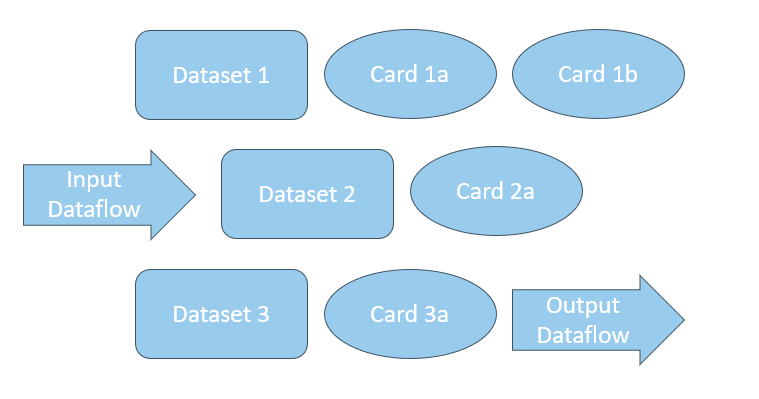 In this example, an input DataFlow produces three output DataSets, all currently unarchived:
* DataSet 1 has two child cards.
* DataSet 2 has one child card.
* DataSet 3 has a child card and a child DataSet.
Because all three DataSets share the same input DataFlow, each DataSet's linked unarchived children count includes the children of all DataSets produced by that DataFlow:
| DataSet | DataFlow | Unarchived children | Linked unarchived children |
| --------- | -------------- | ------------------- | -------------------------- |
| DataSet 1 | Input DataFlow | 2 | 5 |
| DataSet 2 | Input DataFlow | 1 | 5 |
| DataSet 3 | Input DataFlow | 2 | 5 |
## Customize the Archiving Criteria
You configure the archiving criteria in the **Customization** DataFlow. The logic is defined within the formula tile for each content type, and you can adjust the criteria as needed.
In this example, an input DataFlow produces three output DataSets, all currently unarchived:
* DataSet 1 has two child cards.
* DataSet 2 has one child card.
* DataSet 3 has a child card and a child DataSet.
Because all three DataSets share the same input DataFlow, each DataSet's linked unarchived children count includes the children of all DataSets produced by that DataFlow:
| DataSet | DataFlow | Unarchived children | Linked unarchived children |
| --------- | -------------- | ------------------- | -------------------------- |
| DataSet 1 | Input DataFlow | 2 | 5 |
| DataSet 2 | Input DataFlow | 1 | 5 |
| DataSet 3 | Input DataFlow | 2 | 5 |
## Customize the Archiving Criteria
You configure the archiving criteria in the **Customization** DataFlow. The logic is defined within the formula tile for each content type, and you can adjust the criteria as needed.
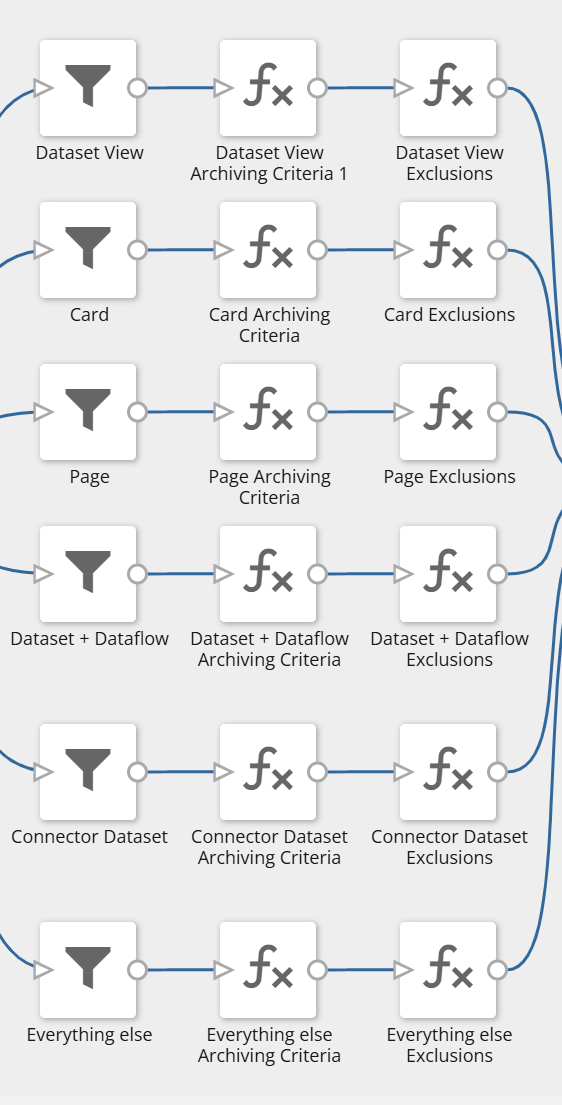 **Important:** Copy any adjustments to the archiving criteria into the matching exclusions formula tile so that users understand why content is, or is not, an archiving candidate.
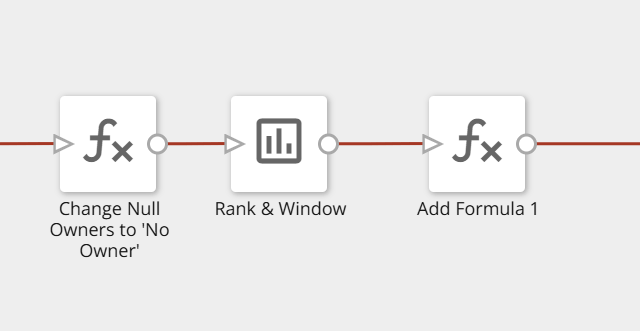
To specify custom criteria that apply to all content, use the final formula tile, the archiving pre-step.
**Important:** Copy any adjustments to the archiving criteria into the matching exclusions formula tile so that users understand why content is, or is not, an archiving candidate.
To specify custom criteria that apply to all content, use the final formula tile, the archiving pre-step.
 ### Enter Parameters in the Input Webforms
You can use four webforms to enter parameters into the archiving process:
* **Archiving Parameters | Archiving —** Adjust the period of time after which content is considered unused. The default is 90 days.
* **Override | Archiving —** Indicate content you want archived even when it does not meet the criteria in the DataFlow.
* **Exclusions | Archiving —** Specify objects that should never be archived.
* **Restoration Input | Archiving —** Specify objects that the restoration workflows should restore.
**Note:** If you are confident in your DataFlow skills, you can adjust any of the CGH DataFlows to meet your archiving needs. As future enhancements are made to the CGH, they are pushed out using Sandbox, so any changes you make may be overridden. Domo notifies you beforehand, and you can decline.
## Account for Exceptions
The DataFlow can determine most cases in which an object is used, but there are several exceptions to be aware of:
| Content | Recommended alternative |
| ------------------------------------------------------------------- | ---------------------------------------------------------------------------------------------------- |
| DataSets accessed directly by API, which may not always be detected | Include in the Exclusions list. |
| Periodic content, such as financial reports used once per year | Include in the Exclusions list. |
| Published content | DomoStats data for published content can occasionally be unreliable. Include in the Exclusions list. |
| DataFusion | Not included, because there is currently no data source for its metadata. |
| Domo packaged apps | Certify any DataSets or cards used in a Domo packaged app. |
| Incremental loads, such as upserts and partitions | If the source data does not exist anywhere else, include in the Exclusions list. |
## Understand How Content Is Archived
Unlike the DataFlow, the workflows are simple and direct. There are two archiving workflows, one for each supported content type.
### Archive a Card
Card archiving follows this process:
1. The archiving group is added to the card as an owner. This group is a preconfigured parameter of the process.
2. The card is removed from all dashboards.
3. The card is added to the archiving dashboard. This dashboard is a preconfigured parameter.
4. All owners except the archiving group are removed.
5. The card title is changed to include `[Archiving]`.
6. All other users are removed.
### Archive a Dashboard
Dashboard archiving follows this process:
1. The archiving group is added to the dashboard as an owner. This group is a preconfigured parameter.
2. The dashboard is moved to be a sub-dashboard of the archiving dashboard. This dashboard is a preconfigured parameter.
3. The dashboard title is changed to include `[Archiving]`.
4. All owners except the archiving group are removed.
5. All other users are removed.
## Restore Archived Content
You can restore archived content using the restoration workflows.
### Restore a Card
Card restoration restores the card's name, owners, and groups.
### Restore a Dashboard
Dashboard restoration moves the dashboard back to its original parent dashboard and restores its name, owners, and groups.
### Enter Parameters in the Input Webforms
You can use four webforms to enter parameters into the archiving process:
* **Archiving Parameters | Archiving —** Adjust the period of time after which content is considered unused. The default is 90 days.
* **Override | Archiving —** Indicate content you want archived even when it does not meet the criteria in the DataFlow.
* **Exclusions | Archiving —** Specify objects that should never be archived.
* **Restoration Input | Archiving —** Specify objects that the restoration workflows should restore.
**Note:** If you are confident in your DataFlow skills, you can adjust any of the CGH DataFlows to meet your archiving needs. As future enhancements are made to the CGH, they are pushed out using Sandbox, so any changes you make may be overridden. Domo notifies you beforehand, and you can decline.
## Account for Exceptions
The DataFlow can determine most cases in which an object is used, but there are several exceptions to be aware of:
| Content | Recommended alternative |
| ------------------------------------------------------------------- | ---------------------------------------------------------------------------------------------------- |
| DataSets accessed directly by API, which may not always be detected | Include in the Exclusions list. |
| Periodic content, such as financial reports used once per year | Include in the Exclusions list. |
| Published content | DomoStats data for published content can occasionally be unreliable. Include in the Exclusions list. |
| DataFusion | Not included, because there is currently no data source for its metadata. |
| Domo packaged apps | Certify any DataSets or cards used in a Domo packaged app. |
| Incremental loads, such as upserts and partitions | If the source data does not exist anywhere else, include in the Exclusions list. |
## Understand How Content Is Archived
Unlike the DataFlow, the workflows are simple and direct. There are two archiving workflows, one for each supported content type.
### Archive a Card
Card archiving follows this process:
1. The archiving group is added to the card as an owner. This group is a preconfigured parameter of the process.
2. The card is removed from all dashboards.
3. The card is added to the archiving dashboard. This dashboard is a preconfigured parameter.
4. All owners except the archiving group are removed.
5. The card title is changed to include `[Archiving]`.
6. All other users are removed.
### Archive a Dashboard
Dashboard archiving follows this process:
1. The archiving group is added to the dashboard as an owner. This group is a preconfigured parameter.
2. The dashboard is moved to be a sub-dashboard of the archiving dashboard. This dashboard is a preconfigured parameter.
3. The dashboard title is changed to include `[Archiving]`.
4. All owners except the archiving group are removed.
5. All other users are removed.
## Restore Archived Content
You can restore archived content using the restoration workflows.
### Restore a Card
Card restoration restores the card's name, owners, and groups.
### Restore a Dashboard
Dashboard restoration moves the dashboard back to its original parent dashboard and restores its name, owners, and groups.