

Intro
Jupyter Workspaces allows you to write AI prompts within Notebooks. Jupyter uses the same prompts as in the Domo. AI Playground without navigating away from Jupyter. Learn more about Jupyter AI and the AI Playground.Required Grants
To access Jupyter, at least one of the following grants must be enabled for your role:- Create Jupyter Workspace — Allows a user to create, edit, and delete Jupyter Workspaces to which they have access.
- Manage Jupyter Workspace (Jupyter Admin) — Allows a user to view, edit, and delete any Jupyter Workspaces in the instance. This grant is needed to enable workspace sharing for other users.
Access Jupyter Workspaces
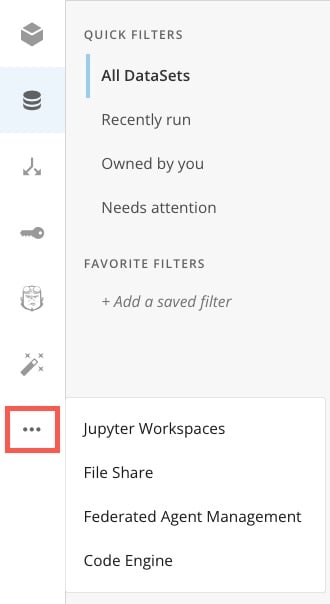
In the navigation header, select Data to open the Data Center. In the left navigation, select More (three horizontal dots icon) > Jupyter Workspaces.
Use the Generate Text Prompt
The generate_text prompt provides answers to questions. In the example, the prompt provided to the AI service is in the prompt_template. It is given a limitation of $, which is provided in the prompt_parameters. The output prompt is provided at the bottom.
${input} within your prompt template text. If you include the ${input} placeholder, then the input_str will automatically be inserted for that placeholder.
The following parameters are available in the generate_text function. All of the parameters are optional except input_str.
Use the Text-to-SQL Prompt
The text_to_sql prompt provides a SQL query based on the question asked. In the example, the prompt provided to the AI service is in the prompt_template, and the specified column is in the prompt_parameters. The functional SQL query is provided in the output at the bottom.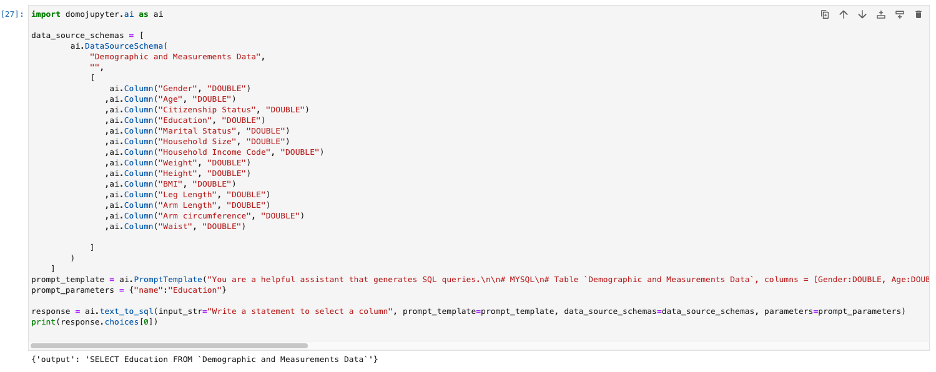
input_str.
Use the Text-to-Beast-Mode Prompt
The Text-to-Beast-Mode service provides a Beast Mode function based on the question asked. In the example, the prompt provided to the AI asks to add all of the value columns (data_source_schemas) together. The Beast Mode function is provided in the output at the bottom.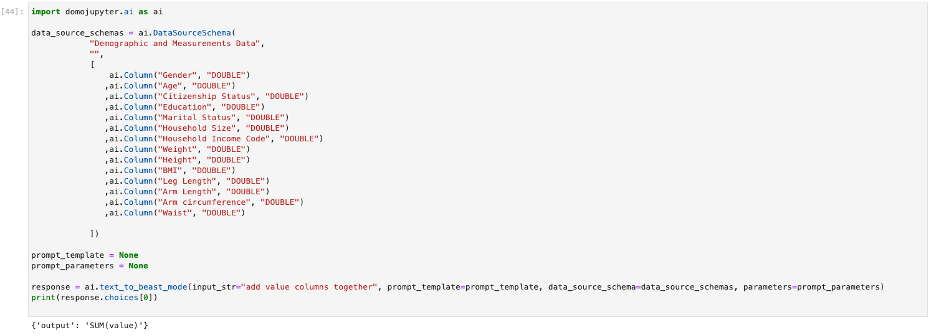
input_str.
Use the Summarize Text Prompt
The summarize_text prompt provides a text summary based on the question asked. In the example, the prompt provided to the AI service is in text_summarization. The output prompt is provided at the bottom.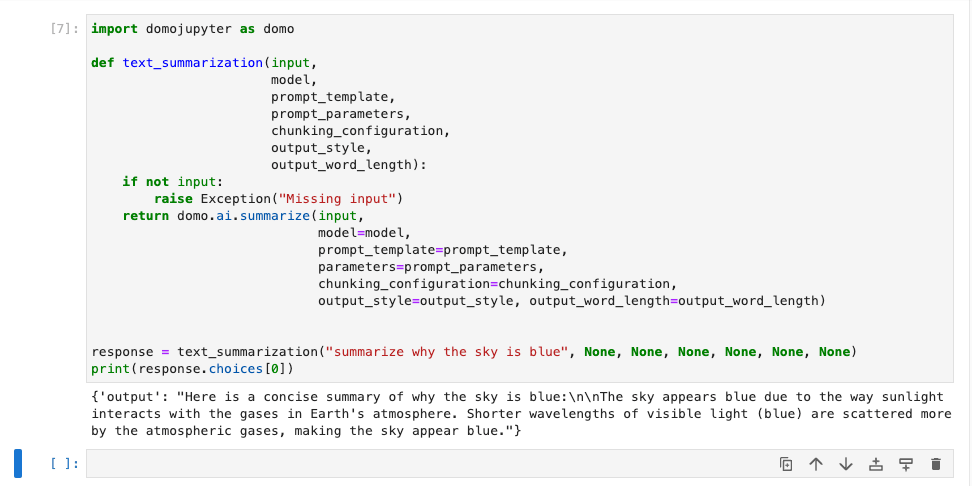
input_str.
Note: The parameter behavior described below should be confirmed against the current product. This content was submitted for PM review.
summarize() function generates a summary from a long block of text using an AI model. It supports optional configurations that control the style, structure, and length of the summary. The only required parameter is input_str.
Optional Parameters
prompt_template
prompt_template (Optional) — The PromptTemplate class helps structure reusable prompt strings for AI tasks. In this implementation, it is lightweight, requiring only a single input: the full prompt text.
parameters
parameters (Optional) — A dictionary used to replace placeholders in the prompt_template.
model and model_configuration
model(Optional) — Name or ID of the language model to be used for summarization.model_configuration(Optional) — A dictionary with custom configuration parameters for a selected language model.
chunking_configuration
chunking_configuration (Optional) — Use this when summarizing large blocks of text. It splits the text into smaller, manageable chunks before summarization.
SeparatorType options: CPP, GO, HTML, JAVA, JAVASCRIPT, LATEX, MARKDOWN, PROTO, PYTHON, RST, RUBY, SCALA, SOL, SWIFT, TEXT.
output_style
output_style (Optional) — Determines the design, structuring, and organization of the summarization’s output.
output_word_length
output_word_length (Optional) — Defines a size boundary to limit the length of the output summary, based on number of words.